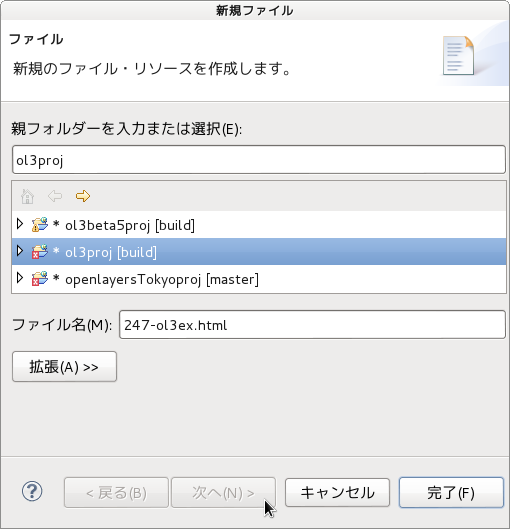
「247-ol3ex.js」
/**
 * Define a namespace for the application.
 */
window.app = {};
var app = window.app;
//
// Define rotate to north control.
//
/**
 * @constructor
 * @extends {ol.control.Control}
 * @param {Object=} opt_options Control options.
 */
/** 「@constructor(@class と同義)」
 * The @class tag marks a function as being a
 * constructor, meant to be called with the new
 * keyword to return an instance.
 * @classタグは、インスタンスを返すために、新しいキーワードで
 * 呼び出されることを意図し、コンストラクタとして function を
 * マークします。
 * (@use JSDoc [http://usejsdoc.org/tags-class.html])
 */
/** 「@extends(@augments と同義)」
 * The @augments or@extends tag indicates that a
 * symbol inherits from, and potentially adds to,
 * a parent symbol. You can use this tag to document
 * both class-based and prototype-based inheritance.
 * @augmentsまたは@@extendsタグは、シンボルが親シンボルから
 * 継承し、潜在的に追加する、ことを示しています。
 * あなたは、クラスベースとプロトタイプベース両方の継承を
 * 文書化するために、このタグを使用することができます。
 * (@use JSDoc [http://usejsdoc.org/tags-augments.html])
 */
/** 「@param」
 * The @param tag (or @arg or @argument) documents a
 * function parameter.
 * The @param tag requires you to specify the name of
 * the parameter you are documenting. You can also
 * include the parameter's type, enclosed in curly
 * brackets, and a description of the parameter.
 * @paramタグ(または@argまたは@argument)は、関数の
 * パラメータを文書化します。
 * @paramタグを使用すると、文書化されたパラメータの名前を
 * 指定する必要があります。また、パラメータのタイプと、中括弧
 * で囲まれたおよびパラメータの説明を含めることができます。
 * (@use JSDoc [http://usejsdoc.org/tags-param.html])
 */
app.RotateNorthControl = function(opt_options) {

 var options = opt_options || {};
 var anchor = document.createElement('a');
 /** document.createElement
  * 指定の要素名の要素を生成します。
  * (MDN[https://developer.mozilla.org/ja/docs/Web/
  * API/document.createElement)
  */
 anchor.href = '#rotate-north';
 /** href
  * この要素がクリックされた時に開かれる URL を定義します。
  * text-link を含めるには class 属性が必要です。
  * (MDN[https://developer.mozilla.org/ja/docs/XUL/
  * Attribute/href])
  */
 anchor.innerHTML = 'N';
 /** element.innerHTML
  * innerHTML は、与えられた要素に含まれる全てのマークアップ
  * と内容を設定または取得します。
  * (MDN[https://developer.mozilla.org/ja/docs/Web/
  * API/element.innerHTML])
  */
 var this_ = this;
 var handleRotateNorth = function(e) {
 /** prevent #rotate-north anchor from getting appended to
  * the url
  * url に(テキスト処理による)付加が起こることから
  * #rotate-north アンカーを防ぐ
  */
  e.preventDefault();
  /** preventDefault()
   * Prevents the default browser action.
   * デフォルトのブラウザの動作を防ぐ。
   * (ol3 API)
   */
  this_.getMap().getView().setRotation(0);
  /** getMap()
   * Get the map associated with this control.
   * このコントロールに関連付けられたマップを取得します。
   * (ol3 API)
   */
  /** getView()
   * Get the view associated with this map. A view
   * manages properties such as center and resolution.
   * このマップに関連付けられたビューを取得します。ビューには、
   * 中心や解像度などのプロパティを管理します。(ol3 API)
   */
  /** setRotation()
   * Set the rotation for this view.
   * このビューのローテーションを設定します。(ol3 API)
   */
 anchor.addEventListener('click', handleRotateNorth, false);
 /** EventTarget.addEventListener
  * addEventListener は、 1 つのイベントターゲットにイベント
  * リスナーを1 つ登録します。イベントターゲットは、ドキュメント
  * 上の単一のノード、ドキュメント自身、ウィンドウ、あるいは、
  * XMLHttpRequest です。
  *(MDN[https://developer.mozilla.org/ja/docs/Web/API/
  * EventTarget.addEventListener])
  */
anchor.addEventListener('touchstart', handleRotateNorth, false);
var element = document.createElement('div');
 element.className = 'rotate-north ol-unselectable';
 /** element.className
  * className は要素の class 属性の値の取得 / 設定に用います。
  * (MDN[https://developer.mozilla.org/ja/docs/Web/API/
  * element.className])
  */
 element.appendChild(anchor);
 /** Node.appendChild
  * 特定の親ノードの子ノードリストの末尾にノードを追加します。
  * 追加しようとしたノードが既に存在していたら、それは現在の
  * 親ノードから除かれ、新しい親ノードに追加されます。
  * (MDN[https://developer.mozilla.org/ja/docs/Web/API/
  * Node.appendChild])
  */
 ol.control.Control.call(this, {
 /** ol.control.Control
  * A control is a visible widget with a DOM element in a
  * fixed position on the screen. They can involve user
  * input (buttons), or be informational only; the
  * position is determined using CSS. By default these
  * are placed in the container with CSS class name
  * ol-overlaycontainer-stopevent, but can use any
  * outside DOM element.
  * コントロールは、画面上の固定位置にDOM要素をともなったの可視
  * ウィジェットです。彼らは、ユーザ入力(ボタン)を、または情報
  * 提供のみを含むことができます。すなわち、位置は、CSSを使用して
  * 決定されます。デフォルトでは、これらはCSSクラス名の
  * ol-overlaycontainer-stopevent と共にコンテナに入れら
  * れますが、DOM要素外部のどこでも使用することができます。
  * (ol3 API)
  */
  element: element,
  /** element:
   * The element is the control's container element.
   * This only needs to be specified if you're
   * developing a custom control.
   * element は、コントロールのコンテナ element です。
   * カスタムコントロールを開発している場合は、指定する必要
   * があります。(ol3 API)
   */
  target: options.target
  /** target
   * Specify a target if you want the control to be
   * rendered outside of the map's viewport.
   * マップのビューポートの外にレンダリングするコントロールが
   * 必要なら、ターゲットを指定してください。(ol3 API)
   */
 });

};
ol.inherits(app.RotateNorthControl, ol.control.Control);
/** ol.inherits(childCtor, parentCtor)
 * Inherit the prototype methods from one constructor
 * into another.
 * 1つのコンストラクタから他にプロトタイプのメソッドを継承します。
 * (ol3 API[説明は Stable Only のチェックを外すと表示])
 */
//
// Create map, giving it a rotate to north control.
//
var map = new ol.Map({
 controls: ol.control.defaults({
 /** controls
  * Controls initially added to the map.
  * If not specified, ol.control.defaults() is used.
  * 初期設定で、マップに追加されるコントロール。
  * 明示されていなければ、ol.control.defaults() が使用されます。
  * (ol3 API)
  */
 /** ol.control.defaults()
  * デフォルトでは、マップに含まコントロールのセット。
  * 特に設定しない限り、これは、以下の各コントロールの
  * インスタンスを含むコレクションを返します。(ol3 API)
  * ol.control.Zoom, ol.control.Rotate, ol.control.Attribution
  */
  attributionOptions: /** @type {olx.control.AttributionOptions} */ ({
  /** @type
   * 値のタイプ(型)の説明 - 式などで表示
   * attributionOptions の値の型は、
   * olx.control.AttributionOptions の型を使用。
   * (@use JSDoc[http://usejsdoc.org/]より)
   */
   collapsible: false // 折りたたみ
  })
 }).extend([
  new app.RotateNorthControl()
 ]),
 layers: [
  new ol.layer.Tile({
   source: new ol.source.OSM()
  })
 ],
 renderer: exampleNS.getRendererFromQueryString(),
 //'example-behavior.js' により URL にある renderer を返します
 target: 'map',
 view: new ol.View({
  center: [0, 0],
  zoom: 2,
  rotation: 1
 })
});