ラベル drag rotate and zoom の投稿を表示しています。 すべての投稿を表示

2014年12月25日木曜日

2 - ol3ex 45b - Drag rotate and zoom example 2

「drag-rotate-and-zoom.js(245-ol3ex.js)」は、マップを表示するための JavaScript ファイルです。

「245-ol3ex.js」
var map = new ol.Map({
 interactions: ol.interaction.defaults().extend([
 /** ol.interaction.defaults
  * Set of interactions included in maps by default. 
  * Specific interactions can be excluded by setting 
  * the appropriate option to false in the constructor 
  * options, but the order of the interactions is fixed. 
  * If you want to specify a different order for 
  * interactions, you will need to create your own 
  * ol.interaction.Interaction instances and insert 
  * them into a ol.Collection in the order you want 
  * before creating your ol.Map instance.
  * デフォルトでマップに含まれるインターラクションのセット。
  * 具体的なインターラクションは、コンストラクタのオプションで適
  * 切なオプションをfalseに設定することで除外することができます
  * が、インターラクションの順番は固定されています。インターラク
  * ションに対して別の順番を指定したい場合は、独自の
  * ol.interaction.Interaction インスタンスを作成し、 ol.Map
  * インスタンスを作成する前に、望む順番で  ol.Collection
  * にそれらを挿入する必要があります。
  * (ol3 API)
  * (訳注:インターラクションの順番は、APIを参照してください。)
  */
  new ol.interaction.DragRotateAndZoom()
  /** ol.interaction.DragRotateAndZoom 
   * Allows the user to zoom and rotate the map by 
   * clicking and dragging on the map. By default, 
   * this interaction is limited to when the shift 
   * key is held down.
   * This interaction is only supported for mouse 
   * devices.
   * And this interaction is not included in the 
   * default interactions.
   * マップ上をクリックとドラッグすることで、マップをズーム
   * し、回転することを許可します。デフォルトでは、このイン
   * ターラクションは、シフトキーを押しているときに制限され
   * ています。
   * このインターラクションは、マウスデバイスだけサポートし
   * ます。
   * このインターラクションは、デフォルトのインターラク
   * ションに含まれません。(ol3 API)
   */
 ]),
 layers: [
  new ol.layer.Tile({
  /** ol.layer.Tile 
   * For layer sources that provide pre-rendered, tiled 
   * images in grids that are organized by zoom levels for 
   * specific resolutions. 
   * プリレンダリング(事前描画)を提供するレイヤソースのための、
   * 特定の解像度でのズームレベルによって編成されているグリッドの
   * タイルイメージ。(ol3 API)
   */
   source: new ol.source.MapQuest({layer: 'sat'})
   /** ol.source.MapQuest
    * Layer source for the MapQuest tile server.
    * MapQuest タイルサーバのレイヤソース。(ol3 API
    * 2 - ol3ex 23b - MapQuest example 2 参照)
    */
  })
 ],
 renderer: exampleNS.getRendererFromQueryString(),
 //'example-behavior.js' により URL にある renderer を返します
 target: 'map',
 view: new ol.View({
  center: [0, 0],
  zoom: 2
 })
});

2 - ol3ex 45a - Drag rotate and zoom example 1

「Drag rotate and zoom example(drag-rotate-and-zoom.html)」を参考に地図を表示してみます。
説明に次のようにあります。

A single interaction to drag, rotate, and zoom.
ドラッグと回転、ズームのための単一インターラクション。
Shift + Drag to rotate and zoom the map around its center.
中心近くでマップを回転とズームするには、Shift+Drag を使用します。

HTML ファイルの作成
a Eclipse のメニューの「ファイル」->「ファイルを開く」をクリックします。


b 「ファイルを開く」ウィンドウで、「user」->「mapsite」->「ol3proj」->「v3.0.0」->「examples」->「drag-rotate-and-zoom.html」をクリックして選択し、「OK」ボタンをクリックします。
同じように「drag-rotate-and-zoom.js」を開きます。


c メニューの「ファイル」->「新規」 -> 「ファイル」をクリックします。


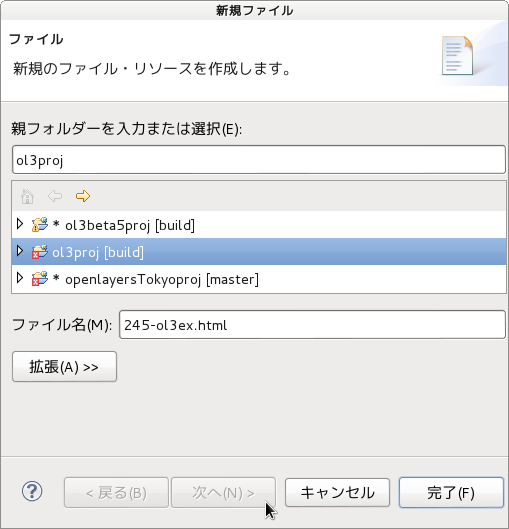
d 「ファイル」ウィンドウで「ol3proj」をクリックして選択し、「ファイル名」を「245-ol3ex.html」と入力し、「次へ」ボタンをクリックします。


e 「File Template」ウィンドウで「HTML 5 Template」をクリックして選択し、「OK」ボタンをクリックします。


f 「drag-rotate-and-zoom.html」の内容をコピーして「245-ol3ex.html」に貼り付け、修正します。
g 同じように、新規に「245-ol3ex.js」ファイルを作成し、「File Template」ウィンドウで「JavaScript Template」をクリックして選択し、「完了」ボタンをクリックして、「drag-rotate-and-zoom.js」の内容をコピーして貼り付け、修正します。「drag-rotate-and-zoom-require.js」も「245-ol3ex-require.js」に貼り付けます。


「245-ol3ex.html」
<!doctype html>
<html lang="en">
 <head>
  <meta charset="utf-8">
  <meta http-equiv="X-UA-Compatible" content="chrome=1">
  <meta name="viewport" content="initial-scale=1.0, user-scalable=no, width=device-width">
<!--
  <link rel="stylesheet" href="../css/ol.css" type="text/css">
  <link rel="stylesheet" href="../resources/bootstrap/css/bootstrap.min.css" type="text/css">
  <link rel="stylesheet" href="../resources/layout.css" type="text/css">
  <link rel="stylesheet" href="../resources/bootstrap/css/bootstrap-responsive.min.css" type="text/css">
-->
  <!-- ディレクトリ修正 -->
  <link rel="stylesheet" href="v3.0.0/css/ol.css" type="text/css">
  <link rel="stylesheet" href="v3.0.0/resources/bootstrap/css/bootstrap.min.css" type="text/css">
  <link rel="stylesheet" href="v3.0.0/resources/layout.css" type="text/css">
  <link rel="stylesheet" href="v3.0.0/resources/bootstrap/css/bootstrap-responsive.min.css" type="text/css">
  <title>Drag rotate and zoom example</title>
 </head>
 <body>
  <!-- 
  bootstrap.min.css, bootstrap-responsive.min.css で設定されたセレクタを使用。
  -->
  <div class="navbar navbar-inverse navbar-fixed-top">
   <div class="navbar-inner">
    <div class="container">
     <!--
     <a class="brand" href="./"><img src="../resources/logo.png"> OpenLayers 3 Examples</a>
     -->
      <!-- ディレクトリ修正 -->
     <a class="brand" href="v3.0.0/examples/"><img src="v3.0.0/resources/logo.png"> OpenLayers 3 Examples</a>
    </div>
   </div>
  </div>
  <div class="container-fluid">
   <div class="row-fluid">
    <div class="span12">
     <div id="map" class="map"></div>
    </div>
   </div>
   <div class="row-fluid">
    <div class="span12">
     <h4 id="title">Drag rotate and zoom example</h4>
     <p id="shortdesc">Example of a rotated map.</p>
     <div id="docs">
      <p><code>Shift</code>+ Drag to rotate and zoom the map around its center.</p>
     <!--
      <p>See the <a href="drag-rotate-and-zoom.js" target="_blank">drag-rotate-and-zoom.js source</a> to see how this is done.</p>
     -->
       <!-- ファイル修正 -->
      <p>See the <a href="245-ol3ex.js" target="_blank">245-ol3ex.js source</a> to see how this is done.</p>
     </div>
     <div id="tags">drag, rotate, zoom, interaction</div>
    </div>
   </div>
  </div>
  <!--
  <script src="jquery.min.js" type="text/javascript"></script>
  <script src="../resources/example-behaviour.js" type="text/javascript"></script>
  -->
  <!-- ディレクトリ修正
   jQuery Minified版と
   example-behaviour.js(Examples用 JSコード[文字コードなど])
  -->
  <script src="v3.0.0/examples/jquery.min.js" type="text/javascript"></script>
  <script src="v3.0.0/resources/example-behaviour.js" type="text/javascript"></script>
  <!--
  <script src="loader.js?id=drag-rotate-and-zoom" type="text/javascript"></script>
  -->
  <!-- ファイル修正 -->  <!-- ディレクトリ修正 -->
  <script src="loader.js?id=245-ol3ex" type="text/javascript"></script>
 </body>
</html>