「Rotation example(rotation.html)」を参考に地図を表示してみます。
説明に次のようにあります。
Use Alt+Shift+drag to rotate the map.
マップを回転するには、Alt+Shift+drag を使用します。
とありますが、操作できませんでした。
HTML ファイルの作成
a Eclipse のメニューの「ファイル」->「ファイルを開く」をクリックします。
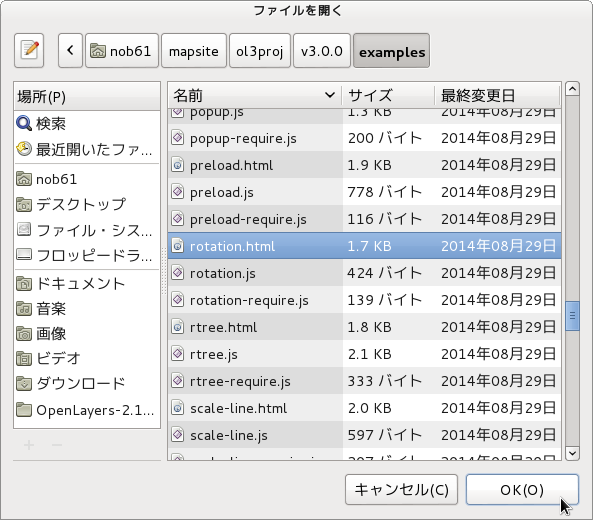
b 「ファイルを開く」ウィンドウで、「user」->「mapsite」->「ol3proj」->「v3.0.0」->「examples」->「rotation.html」をクリックして選択し、「OK」ボタンをクリックします。
同じように「rotation.js」を開きます。
c メニューの「ファイル」->「新規」 -> 「ファイル」をクリックします。
d 「ファイル」ウィンドウで「ol3proj」をクリックして選択し、「ファイル名」を「244-ol3ex.html」と入力し、「次へ」ボタンをクリックします。
e 「File Template」ウィンドウで「HTML 5 Template」をクリックして選択し、「OK」ボタンをクリックします。
f 「rotation.html」の内容をコピーして「244-ol3ex.html」に貼り付け、修正します。
g 同じように、新規に「244-ol3ex.js」ファイルを作成し、「File Template」ウィンドウで「JavaScript Template」をクリックして選択し、「完了」ボタンをクリックして、「rotation.js」の内容をコピーして貼り付け、修正します。「rotation-require.js」も「244-ol3ex-require.js」に貼り付けます。
「244-ol3ex.html」
<!doctype html>
<html lang="en">
 <head>
  <meta charset="utf-8">
  <meta http-equiv="X-UA-Compatible" content="chrome=1">
  <meta name="viewport" content="initial-scale=1.0, user-scalable=no, width=device-width">
<!--
  <link rel="stylesheet" href="../css/ol.css" type="text/css">
  <link rel="stylesheet" href="../resources/bootstrap/css/bootstrap.min.css" type="text/css">
  <link rel="stylesheet" href="../resources/layout.css" type="text/css">
  <link rel="stylesheet" href="../resources/bootstrap/css/bootstrap-responsive.min.css" type="text/css">
-->
  <!-- ディレクトリ修正 -->
  <link rel="stylesheet" href="v3.0.0/css/ol.css" type="text/css">
  <link rel="stylesheet" href="v3.0.0/resources/bootstrap/css/bootstrap.min.css" type="text/css">
  <link rel="stylesheet" href="v3.0.0/resources/layout.css" type="text/css">
  <link rel="stylesheet" href="v3.0.0/resources/bootstrap/css/bootstrap-responsive.min.css" type="text/css">
  <title>Rotation example</title>
 </head>
 <body>
  <!--
  bootstrap.min.css, bootstrap-responsive.min.css で設定されたセレクタを使用。
  -->
  <div class="navbar navbar-inverse navbar-fixed-top">
   <div class="navbar-inner">
    <div class="container">
     <!--
     <a class="brand" href="./"><img src="../resources/logo.png"> OpenLayers 3 Examples</a>
     -->
      <!-- ディレクトリ修正 -->
     <a class="brand" href="v3.0.0/examples/"><img src="v3.0.0/resources/logo.png"> OpenLayers 3 Examples</a>
    </div>
   </div>
  </div>
  <div class="container-fluid">
   <div class="row-fluid">
    <div class="span12">
     <div id="map" class="map"></div>
    </div>
   </div>
   <div class="row-fluid">
    <div class="span12">
     <h4 id="title">Rotation example</h4>
<p id="shortdesc">Example of a rotated map.</p>
     <div id="docs">
      <p>Use <code>Alt</code>+<code>Shift</code>+drag to rotate the map.</p>
     <!--
      <p>See the <a href="rotation.js" target="_blank">rotation.js source</a> to see how this is done.</p>
     -->
       <!-- ファイル修正 -->
      <p>See the <a href="244-ol3ex.js" target="_blank">244-ol3ex.js source</a> to see how this is done.</p>
     </div>
     <div id="tags">rotation, openstreetmap</div>
    </div>
   </div>
  </div>
  <!--
  <script src="jquery.min.js" type="text/javascript"></script>
  <script src="../resources/example-behaviour.js" type="text/javascript"></script>
  -->
  <!-- ディレクトリ修正
   jQuery Minified版と
   example-behaviour.js(Examples用 JSコード[文字コードなど])
  -->
  <script src="v3.0.0/examples/jquery.min.js" type="text/javascript"></script>
  <script src="v3.0.0/resources/example-behaviour.js" type="text/javascript"></script>
  <!--
  <script src="loader.js?id=rotation" type="text/javascript"></script>
  -->
  <!-- ファイル修正 -->  <!-- ディレクトリ修正 -->
  <script src="loader.js?id=244-ol3ex" type="text/javascript"></script>
 </body>
</html>



