ラベル canvas の投稿を表示しています。 すべての投稿を表示

2016年10月31日月曜日

2 - ol3.19ex 159b - Styling feature with CanvasGradient or CanvasPattern 2

「canvas-gradient-pattern.js(2159-ol3ex.js)」は、マップを表示するための JavaScript ファイルです。

「2159-ol3ex.js」
var canvas = document.createElement('canvas');
var context = canvas.getContext('2d');
/** HTMLCanvasElement.getContext()
 * The HTMLCanvasElement.getContext() method returns a 
 * drawing context on the canvas, or null if the 
 * context identifier is not supported.
 * HTMLCanvasElement.getContext()メソッドは、キャンバ
 * ス上の描画コンテキストを返すか、または コンテキスト識別
 * 子がサポートされていない場合、null を返します。
 * contextType Is a DOMString containing the context 
 * identifier defining the drawing context associated 
 * to the canvas.
 * "2d", leading to the creation of a 
 * CanvasRenderingContext2D object representing a 
 * two-dimensional rendering context.
 * contextTypeは canvas に関連する描画コンテキストを定義
 * するコンテキスト識別子を含む DOMString  です。
 * 「2D」、二次元のレンダリングコンテキストを表す
 * CanvasRenderingContext2D オブジェクトの作成につなが
 * ります。
 * (MDN[https://developer.mozilla.org/en-US/docs/Web/
 * API/HTMLCanvasElement/getContext])
 */
// Gradient and pattern are in canvas pixel space, so 
// we adjust for the renderer's pixel ratio
// グラデーションとパターンはキャンバスピクセルスペースなので、
// レンダラー画素率を調整します
var pixelRatio = ol.has.DEVICE_PIXEL_RATIO;
/** ol.has.DEVICE_PIXEL_RATIO
 * The ratio between physical pixels and 
 * device-independent pixels (dips) on the device 
 * (window.devicePixelRatio).
 * デバイス(window.devicePixelRatio)上の物理的な画素とデバ
 * イスに依存しないピクセル(ディップ)との比率。(ol3 API)
 */
// Generate a rainbow gradient
function gradient(feature, resolution) {
 var extent = feature.getGeometry().getExtent();
 /** getGeometry()
  * Get the feature's default geometry. A feature may 
  * have any number of named geometries. The "default" 
  * geometry (the one that is rendered by default) is 
  * set when calling ol.Feature#setGeometry.
  * フィーチャのデフォルトのジオメトリを取得します。フィーチャ
  * は、任意の数の指定のジオメトリのを有することができます。
  * 「デフォルト」のジオメトリ(デフォルトでレンダリングされ
  * るもの)が ol.Feature#setGeometry を呼び出すときに
  * 設定されています。(ol3 API)
  */
 /** getExtent(opt_extent)
  * Get the extent of the geometry.
  * ジオメトリの範囲を取得します。(ol3 API)
  */
 // Gradient starts on the left edge of each feature, and 
 // ends on the right. Coordinate origin is the top-left 
 // corner of the extent of the geometry, so we 
 // just divide by resolution and multiply with pixelRatio 
 // to match the renderer's pixel coordinate system.
 // グラデーションは、各フィーチャの左端から開始され、右側で終
 // 了します。座標原点はジオメトリの範囲の左上隅座標で、レンダ
 // リングのピクセル座標系を一致させるために単に resolution 
 // で割り、pixelRatio を掛けます。
 var grad = context.createLinearGradient(0, 0,
 /** CanvasRenderingContext2D.createLinearGradient()
  * The CanvasRenderingContext2D.createLinearGradient() 
  * method of the Canvas 2D API creates a gradient along 
  * the line given by the coordinates represented by the 
  * parameters. This method returns a linear 
  * CanvasGradient.
  * Canvas 2D API の 
  * CanvasRenderingContext2D.createLinearGradient() 
  * メソッドは、パラメータによって表される座標で指定された線に
  * 沿ってグラデーションを作成します。この方法は、線形 
  * CanvasGradient を返します。
  * (MDN[https://developer.mozilla.org/ja/docs/Web/
  * API/CanvasRenderingContext2D/createLinearGradient])
  */
  ol.extent.getWidth(extent) / resolution * pixelRatio, 0);
 grad.addColorStop(0, 'red');
 /** CanvasGradient.addColorStop()
  * The CanvasGradient.addColorStop() method adds a new 
  * stop, defined by an offset and a color, to the 
  * gradient. If the offset is not between 0 and 1, an 
  * INDEX_SIZE_ERR is raised, if the color can't be 
  * parsed as a CSS , a SYNTAX_ERR is raised.
  * CanvasGradient.addColorStop() メソッドは、グラデー
  * ションに、オフセットと色によって定義される新しい stop を
  * 追加します。オフセットが 0 と 1 の間にない場合は、
  * INDEX_SIZE_ERR が発生し、色が CSS  として解析
  * できない場合は、SYNTAX_ERR が発生します。
  * (MDN[https://developer.mozilla.org/ja/docs/Web/
  * API/CanvasGradient/addColorStop])
  */
 grad.addColorStop(1 / 6, 'orange');
 grad.addColorStop(2 / 6, 'yellow');
 grad.addColorStop(3 / 6, 'green');
 grad.addColorStop(4 / 6, 'aqua');
 grad.addColorStop(5 / 6, 'blue');
 grad.addColorStop(1, 'purple');
 return grad;
}
// Generate a canvasPattern with two circles on white 
// background
// 白地に2つの円で canvasPattern を生成します
var pattern = (function() {
 canvas.width = 11 * pixelRatio;
 canvas.height = 11 * pixelRatio;
 // white background
 context.fillStyle = 'white';
 /** CanvasRenderingContext2D.fillStyle
  * The CanvasRenderingContext2D.fillStyle property of 
  * the Canvas 2D API specifies the color or style to 
  * use inside shapes. The default is #000 (black).
  * Canvas 2D API の CanvasRenderingContext2D.fillStyle 
  * プロパティは、図形の内側に使用する色やスタイルを指定します。
  * デフォルトでは、#000(黒)です。
  * (MDN[https://developer.mozilla.org/en-US/docs/Web/
  * API/CanvasRenderingContext2D/fillStyle])
  */
 context.fillRect(0, 0, canvas.width, canvas.height);
 /** CanvasRenderingContext2D.fillRect()
  * The CanvasRenderingContext2D.fillRect() method of 
  * the Canvas 2D API draws a filled rectangle at (x, y) 
  * position whose size is determined by width and 
  * height and whose style is determined by the fillStyle 
  * attribute.
  * Canvas 2D API の CanvasRenderingContext2D.fillRect()
  * メソッドは、幅と高さによって決定されたサイズと、fillStyle 属
  * 性によって決定されたスタイルの位置(x、y)で塗りつぶされた矩
  * 形を描画します。
  * (MDN[https://developer.mozilla.org/en-US/docs/Web/
  * API/CanvasRenderingContext2D/fillRect])
  */
 // outer circle
 context.fillStyle = 'rgba(102, 0, 102, 0.5)';
 context.beginPath();
 /** CanvasRenderingContext2D.beginPath()
  * The CanvasRenderingContext2D.beginPath() method of the 
  * Canvas 2D API starts a new path by emptying the list 
  * of sub-paths. Call this method when you want to create 
  * a new path.
  * Canvas 2D API の CanvasRenderingContext2D.beginPath() 
  * メソッドは、サブパスのリストを空にすることによって新しいパ
  * スを開始します。新しいパスを作成したいときに、このメソッド
  * を呼び出します。
  * (MDN[https://developer.mozilla.org/en-US/docs/Web/
  * API/CanvasRenderingContext2D/beginPath])
  */
 context.arc(5 * pixelRatio, 5 * pixelRatio, 4 * pixelRatio, 0, 2 * Math.PI);
 /** CanvasRenderingContext2D.arc() 
  * The CanvasRenderingContext2D.arc() method of the 
  * Canvas 2D API adds an arc to the path which is 
  * centered at (x, y) position with radius r starting at 
  * startAngle and ending at endAngle going in the given 
  * direction by anticlockwise (defaulting to clockwise).
  * Canvas 2D API の CanvasRenderingContext2D.arc() メ
  * ソッドは、半径 r の位置(x、y)を中心とする反時計回り(初
  * 期値は時計回り)に startAngle で始まり endAngle で終わる
  * 弧をパスに追加します。
  * (MDN[https://developer.mozilla.org/en-US/docs/Web/
  * API/CanvasRenderingContext2D/arc])
  */
 context.fill();
 /** CanvasRenderingContext2D.fill()
  * The CanvasRenderingContext2D.fill() method of the 
  * Canvas 2D API fills the current or given path with 
  * the current fill style using the non-zero or even-odd 
  * winding rule.
  * Canvas 2D API の CanvasRenderingContext2D.fill() メソッ
  * ドは、非ゼロ、または、偶奇屈曲規則を使用する現在の塗りつぶし
  * スタイルで、現在、または、指定されたパスを塗りつぶします。
  * (MDN[https://developer.mozilla.org/en-US/docs/Web/
  * API/CanvasRenderingContext2D/fill])
  */
 // inner circle
 context.fillStyle = 'rgb(55, 0, 170)';
 context.beginPath();
 context.arc(5 * pixelRatio, 5 * pixelRatio, 2 * pixelRatio, 0, 2 * Math.PI);
 context.fill();
 return context.createPattern(canvas, 'repeat');
 /** CanvasRenderingContext2D.createPattern()
  * The CanvasRenderingContext2D.createPattern() method 
  * of the Canvas 2D API creates a pattern using the 
  * specified image (a CanvasImageSource). It repeats the 
  * source in the directions specified by the repetition 
  * argument. This method returns a CanvasPattern.
  * Canvas 2D API の CanvasRenderingContext2D.createPattern() 
  * メソッドは、指定されたイメージ(CanvasImageSource)を使用
  * してパターンを作成します。これは、繰り返し引数で指定された
  * 方向にソースを繰り返します。このメソッドは、CanvasPattern 
  * を返します。
  * (MDN[https://developer.mozilla.org/en-US/docs/Web/
  * API/CanvasRenderingContext2D/createPattern])
  */
}());
// Generate style for gradient or pattern fill
// グラデーションまたはパターン塗りつぶしのスタイルを生成します。
var fill = new ol.style.Fill();
/** ol.style.Fill 
 * Set fill style for vector features.
 * ベクタフィーチャの塗りつぶしスタイルを設定。
 * (ol3 API[説明は Stable Only のチェックを外すと表示])
 */
var style = new ol.style.Style({
/** ol.style.Style 
 * Container for vector feature rendering styles. Any 
 * changes made to the style or its children through 
 * set*() methods will not take effect until the feature 
 * or layer that uses the style is re-rendered.
 * ベクタフィーチャがスタイルを描画するためのコンテナ。
 * スタイルや set*() メソッドを通じてその子に加えられた変
 * 更は、スタイルを使用するフィーチャまたはレイヤが再レン
 * ダリングされるまで有効になりません。
 * (ol3 API[説明は Stable Only のチェックを外すと表示])
 */
 fill: fill,
 stroke: new ol.style.Stroke({
 /** ol.style.Stroke 
  * Set stroke style for vector features. 
  * Note that the defaults given are the Canvas defaults, 
  * which will be used if option is not defined. 
  * The get functions return whatever was entered 
  * in the options;  they will not return the default.
  * ベクタフィーチャのためのストロークスタイルの設定。
  * デフォルトは、オプションが定義されていない場合に使用さ
  * れる Canvas のデフォルトを与えられることに注意してくだ
  * さい。GET 関数は、オプションで入力されたものはすべて返
  * す。それらはデフォルトを返しません。
  * (ol3 API[説明は Stable Only のチェックを外すと表示])
  */
  color: '#333',
  /** color
   * A color, gradient or pattern. See ol.color and 
   * ol.colorlike for possible formats. Default null; 
   * if null, the Canvas/renderer default black will 
   * be used.
   * 色、グラデーションまたはパターン。可能なフォーマットの対す
   * る ol.color と oil.color を参照してください。デフォルトは 
   * null; null の場合は、Canvas/renderer デフォルトの黒が
   * 使用されます。
  * (ol3 API[説明は Stable Only のチェックを外すと表示])
   */
  width: 2
 })
});
/**
 * The styling function for the vector layer, will 
 * return an array of styles which either contains 
 * the aboove gradient or pattern.
 * ベクトルレイヤのスタイリングの関数は、上記のグラデーション、
 * または、パターンのいずれかを含むスタイルの配列を返します。
 *
 * @param {ol.Feature} feature The feature to style.
 * @param {number} resolution Resolution.
 * @return {ol.style.Style} The style to use for the feature.
 */
/** 「@param」
 * The @param tag provides the name, type, and 
 * description of a function parameter.
 * The @param tag requires you to specify the name of 
 * the parameter you are documenting. You can also 
 * include the parameter's type, enclosed in curly 
 * brackets, and a description of the parameter.
 * @paramタグは、関数パラメータの名前と型、説明を提供します。
 * @paramタグを使用すると、文書化されたパラメータの名前を
 * 指定する必要があります。また、パラメータのタイプと、中括弧
 * で囲まれたおよびパラメータの説明を含めることができます。
 * (@use JSDoc [http://usejsdoc.org/tags-param.html])
 */
/** @return(@returns と同義)
 * The @returns tag documents the value that a function 
 * returns.
 * @returns タグは、関数が返す値について説明します。
 * (@use JSDoc [http://usejsdoc.org/tags-returns..html])
 */
var getStackedStyle = function(feature, resolution) {
 var id = feature.getId();
 /** getId()
  * Get the feature identifier. This is a stable identifier 
  * for the feature and is either set when reading data 
  * from a remote source or set explicitly by calling 
  * ol.Feature#setId.
  * フィーチャ識別子を取得します。これは、フィーチャの安定した識
  * 別子で、リモートソースからデータを読み取るか、
  * ol.Feature#setid を呼び出すことによって明示的に設定した場合
  * のいずれかのセットです。(ol3 API)
  */
 fill.setColor(id > 'J' ? gradient(feature, resolution) : pattern);
 /** setColor(color)
  * Set the color.(ol3 API)
  */
 /** 条件演算子 condition ? expr1 : expr2 
  * condition: true か false かを評価する条件文です。
  * expr1, expr2: 各々の値の場合に実行する式です。
  * condition が true の場合、演算子は expr1 の値を選択しま
  * す。そうでない場合は expr2 の値を選択します。
  * (MDN[https://developer.mozilla.org/ja/docs/Web/
  * JavaScript/Guide/Expressions_and_Operators])
  */
 return style;
};
// Create a vector layer that makes use of the style 
// function above…
// 上記のスタイル関数を使用したベクタレイヤを作成します。
var vectorLayer = new ol.layer.Vector({
/** ol.layer.Vector
 * Vector data that is rendered client-side.
 * クライアント側で描画されるベクタデータ。(ol3 API)
 */
 source: new ol.source.Vector({
 /** ol.source.Vector
  * Provides a source of features for vector layers. 
  * Vector features provided by this source are 
  * suitable for editing. See ol.source.VectorTile for 
  * vector data that is optimized for rendering.
  * ベクタレイヤのフィーチャのソースを用意します。このソース
  * が提供するベクタフィーチャは、編集に適しています。レンダ
  * リングのために最適化されたベクタデータの 
  * ol.source.VectorTile を参照してください。(ol3 API)
  */
  // url: 'data/geojson/countries.geojson',
  url: 'v3.19.0/examples/data/geojson/countries.geojson',
  /** url
   * Setting this option instructs the source to load 
   * features using an XHR loader (see 
   * ol.featureloader.xhr). Use a string and an 
   * ol.loadingstrategy.all for a one-off download of 
   * all features from the given URL. Use a 
   * ol.FeatureUrlFunction to generate the url with 
   * other loading strategies. Requires format to be 
   * set as well. When default XHR feature loader is 
   * provided, the features will be transformed from 
   * the data projection to the view projection during 
   * parsing. If your remote data source does not 
   * advertise its projection properly, this 
   * transformation will be incorrect. For some formats, 
   * the default projection (usually EPSG:4326) can be 
   * overridden by setting the defaultDataProjection 
   * constructor option on the format. Note that if a 
   * source contains non-feature data, such as a 
   * GeoJSON geometry or a KML NetworkLink, these will 
   * be ignored. Use a custom loader to load these.
   * このオプションを設定すると、XHR ローダーを
   * (ol.featureloader.xhr参照)を使用してフィーチャを
   * ロードするためのソースを指示します。指定された URL から
   * のすべてのフィーチャの1回限りのダウンロードのために 
   * string と ol.loadingstrategy.all を使用してくださ
   * い。他のローディングストラテジと共に URL を生成するため
   * に、ol.FeatureUrlFunctionを使用してください。format 
   * も同様に設定する必要があります。デフォルトの XHR フィー
   * チャローダが提供される場合、フィーチャは、解析中にデータ
   * 投影からビュー投影へ変換されます。リモート・データ・ソー
   * スが適切に投影を示していない場合は、この変換は不正確にな
   * ります。いくつかのフォーマットでは、デフォルトの投影(通
   * 常はEPSG:4326)は、フォーマット上の 
   * defaultDataProjection constructor オプションを設
   * 定することで上書きすることができます。ソースが、このような 
   * GeoJSON ジオメトリ、または、 KML NetworkLink などの
   * 非フィーチャデータを含んでいる場合、これらは無視されること
   * に注意してください。これらをロードするために、カスタムロー
   * ダーを使用してください。
   * (ol3 API[説明は Stable Only のチェックを外すと表示])
   */
  format: new ol.format.GeoJSON()
  /** format
   * he feature format used by the XHR feature loader 
   * when url is set. Required if url is set, otherwise 
   * ignored. Default is undefined.
   * フィーチャのフォーマットは、url が設定されている場合、XHR
   * フィーチャローダーで使用されます。url が設定されている場合
   * は必須で、それ以外の場合は無視されます。デフォルトは未定義
   * です。
   * (ol3 API[説明は Stable Only のチェックを外すと表示])
   */
 }),
 style: getStackedStyle
 /** style
  * Layer style. See ol.style for default style which 
  * will be used if this is not defined.
  * レイヤスタイル。これが定義されていない場合に使用されるデフォ
  * ルトのスタイルについては ol.style を参照してください。
  * (ol3 API)
  */
});
// … finally create a map with that layer.
// 最後に、そのレイヤと共にマップを作成します。
var map = new ol.Map({
 layers: [
  vectorLayer
 ],
 target: 'map',
 view: new ol.View({
  center: ol.proj.fromLonLat([7, 52]),
  /** ol.proj.fromLonLat(coordinate, opt_projection)
   * Transforms a coordinate from longitude/latitude to a 
   * different projection.
   * 緯度/経度座標から異なる投影に変換します。(ol3 API)
   */
  zoom: 3
 })
});

2015年12月31日木曜日

2 - ol3.12ex 146b - Render geometries to a canvas 2

「render-geometry.js(2146-ol3ex.js)」は、マップを表示するための JavaScript ファイルです。

「2146-ol3ex.js」
var canvas = document.getElementById('canvas');
var render = ol.render.toContext(canvas.getContext('2d'), {size: [100, 100]});
/** ol.render.toContext(context, opt_options)
 * Binds a Canvas Immediate API to a canvas context, 
 * to allow drawing geometries to the context's 
 * canvas.
 * The units for geometry coordinates are css pixels 
 * relative to the top left corner of the canvas 
 * element.
 * Note that ol.render.canvas.Immediate#drawAsync 
 * and ol.render.canvas.Immediate#drawFeature 
 * cannot be used.
 * コンテキストのキャンバス(canvas)にジオメトリを描画でき
 * るように、Canvas Immediate API をキャンバスコンテキス
 * ト(canvas context)にバインドします。
 * ジオメトリの座標の単位は canvas 要素の左上隅からの相対 
 * css ピクセルです。
 * ol.render.canvas.Immediate#drawAsynと
 * ol.render.canvas.Immediate#drawFeature は使用出来
 * ないことに注意してください。
 * (ol3 API[説明は Stable Only のチェックを外すと表示])
 */
/** HTMLCanvasElement.getContext()
 * The HTMLCanvasElement.getContext() method returns a 
 * drawing context on the canvas, or null if the 
 * context identifier is not supported.
 * HTMLCanvasElement.getContext()メソッドは、キャンバ
 * ス上の描画コンテキストを返すか、または コンテキスト識別
 * 子がサポートされていない場合、null を返します。
 * contextType Is a DOMString containing the context 
 * identifier defining the drawing context associated 
 * to the canvas.
 * "2d", leading to the creation of a 
 * CanvasRenderingContext2D object representing a 
 * two-dimensional rendering context.
 * contextTypeは canvas に関連する描画コンテキストを定義
 * するコンテキスト識別子を含む DOMString  です。
 * 「2D」、二次元のレンダリングコンテキストを表す
 * CanvasRenderingContext2D オブジェクトの作成につなが
 * ります。
 * (MDN[https://developer.mozilla.org/en-US/docs/Web/
 * API/HTMLCanvasElement/getContext])
 */
/** size:
 * Desired size of the canvas in css pixels. When 
 * provided, both canvas and css size will be set 
 * according to the pixelRatio. If not provided, the 
 * current canvas and css sizes will not be altered.
 * css ピクセル単位の canvas の希望のサイズ。提供される場
 * 合、canvas とcss サイズ両方とも画素比率に応じて設定され
 * ます。提供されていない場合は、現在の canvas と css のサ
 * イズは変更されません。
 * (ol3 API[説明は Stable Only のチェックを外すと表示])
 */
var fill = new ol.style.Fill({ color: 'blue' });
/** ol.style.Fill 
 * Set fill style for vector features.
 * ベクタフィーチャの塗りつぶしスタイルを設定。
 * (ol3 API[説明は Stable Only のチェックを外すと表示])
 */
var stroke = new ol.style.Stroke({ color: 'black' });
/** ol.style.Stroke 
 * Set stroke style for vector features. 
 * Note that the defaults given are the Canvas defaults, 
 * which will be used if option is not defined. 
 * The get functions return whatever was entered 
 * in the options;  they will not return the default.
 * ベクタフィーチャのためのストロークスタイルの設定。
 * デフォルトは、オプションが定義されていない場合に使用さ
 * れる Canvas のデフォルトを与えられることに注意してくだ
 * さい。GET 関数は、オプションで入力されたものはすべて返
 * す。それらはデフォルトを返しません。
 * (ol3 API[説明は Stable Only のチェックを外すと表示])
 */
render.setFillStrokeStyle(fill, stroke);
/** setFillStrokeStyle(fillStyle, strokeStyle)
 * Set the fill and stroke style for subsequent draw 
 * operations. To clear either fill or stroke styles, 
 * pass null for the appropriate parameter.
 * 後の描画操作のための塗りと線のスタイルを設定します。塗り
 * または線のスタイルのいずれかをクリアするために、適切なパ
 * ラメータに null を渡します。
 * (ol3 API[説明は Stable Only のチェックを外すと表示])
 */
render.setImageStyle(new ol.style.Circle({
/** setImageStyle()
 * Set the image style for subsequent draw 
 * operations. Pass null to remove the image 
 * style.
 * その後のドロー操作のための画像のスタイルを設定します。
 * 画像のスタイルを削除するには null を渡します。
 * (ol3 API[説明は Stable Only のチェックを外すと表示])
 */
/** ol.style.Circle
 * Set circle style for vector features.
 * ベクタフィーチャの円のスタイルを設定。(ol3 API)
 */
 radius: 10,
 fill: fill,
 stroke: stroke
}));
render.drawLineStringGeometry(new ol.geom.LineString([[10, 10], [90, 90]]));
/**  drawLineStringGeometry(lineStringGeometry) experimental
 * Render a LineString into the canvas. Rendering is 
 * immediate and uses the current style.
 * canvas(キャンバス)に LineString をレンダリングします。
 * レンダリングは即時であり、現在のスタイルを使用します。
 * (ol3 API[説明は Stable Only のチェックを外すと表示])
 */
/** ol.geom.LineString
 * Linestring geometry.(ol3 API)
 */
render.drawPolygonGeometry(
/** drawPolygonGeometry(polygonGeometry)
 * Render a Polygon geometry into the canvas. 
 * Rendering is immediate and uses the current style.
 * キャンバス(canvas)にポリゴンジオメトリ(Polygon 
 * geometry)をレンダリングします。レンダリングは即時であ
 * り、現在のスタイルを使用します。
 * (ol3 API[説明は Stable Only のチェックを外すと表示])
 */
 new ol.geom.Polygon([[[2, 2], [98, 2], [2, 98], [2, 2]]]));
 /** ol.geom.Polygon
  * Polygon geometry.(ol3 API)
  */
render.drawPointGeometry(new ol.geom.Point([88, 88]));
/** drawPointGeometry(pointGeometry)
 * Render a Point geometry into the canvas. 
 * Rendering is immediate and uses the current style.
 * キャンバス(canvas)にポイントジオメトリ(Point 
 * geometry)をレンダリングします。レンダリングは即時であ
 * り、現在のスタイルを使用します。
 * (ol3 API[説明は Stable Only のチェックを外すと表示])
 */
/** ol.geom.Point
 * Point geometry.(ol3 API)
 */

2 - ol3.12ex 146a - Render geometries to a canvas 1

「Render geometries to a canvas (render-geometry.html)」を参考に地図を表示してみます。
説明に次のようにあります。

This example shows how to render geometries to an arbitrary canvas.
この例では、任意のキャンバスにジオメトリをレンダリングする方法を示しています。


HTML ファイルの作成
a Eclipse のメニューの「ファイル」->「ファイルを開く」をクリックします。


b 「ファイルを開く」ウィンドウで、「user」->「mapsite」->「ol3proj」->「v3.12.1」->「examples」->「render-geometry.html」をクリックして選択し、「OK」ボタンをクリックします。
同じように「render-geometry.js」を開きます。


c メニューの「ファイル」->「新規」 -> 「ファイル」をクリックします。


d 「ファイル」ウィンドウで「ol3proj」をクリックして選択し、「ファイル名」を「2146-ol3ex.html」と入力し、「次へ」ボタンをクリックします。


e 「File Template」ウィンドウで「HTML 5 Template」をクリックして選択し、「OK」ボタンをクリックします。


f 「render-geometry.html」の内容をコピーして「2146-ol3ex.html」に貼り付け、修正します。
g 同じように、新規に「2146-ol3ex.js」ファイルを作成し、「File Template」ウィンドウで「JavaScript Template」をクリックして選択し、「完了」ボタンをクリックして、「render-geometry.js」の内容をコピーして貼り付け、修正します。「render-geometry-require.js」も「2146-ol3ex-require.js」に貼り付けます。

「2146-ol3ex.html」
<!doctype html>
<html lang="en">
 <head>
  <meta charset="utf-8">
  <meta http-equiv="X-UA-Compatible" content="chrome=1">
  <meta name="viewport" content="initial-scale=1.0, user-scalable=no, width=device-width">
  <link rel="stylesheet" href="http://maxcdn.bootstrapcdn.com/font-awesome/4.4.0/css/font-awesome.min.css" type="text/css">
  <link rel="stylesheet" href="http://maxcdn.bootstrapcdn.com/bootstrap/3.3.5/css/bootstrap-combined.min.css" type="text/css">
  <!--
  <link rel="stylesheet" href="../css/ol.css" type="text/css">
  <link rel="stylesheet" href="./resources/layout.css" type="text/css">

  <link rel="stylesheet" href="./resources/prism/prism.css" type="text/css">
  <script src="./resources/zeroclipboard/ZeroClipboard.min.js"></script>

  「resources」の位置が変わりました。
  -->
  <!-- ディレクトリ修正 -->
  <link rel="stylesheet" href="v3.12.1/css/ol.css" type="text/css">
  <link rel="stylesheet" href="v3.12.1/examples/resources/layout.css" type="text/css">

  <link rel="stylesheet" href="v3.12.1/examples/resources/prism/prism.css" type="text/css">
  <script src="v3.12.1/examples/resources/zeroclipboard/ZeroClipboard.min.js"></script>
  <script src="https://cdn.polyfill.io/v2/polyfill.min.js?features=fetch"></script>
  <title>Render geometries to a canvas</title>
 </head>
 <body>
  <!-- 
  bootstrap-combined.min.css, ol.css, layout.css,
  CSSファイルで設定されたセレクタを使用。
  -->
  <header class="navbar" role="navigation">
   <div class="container" id="navbar-inner-container">
    <!--
    <a class="navbar-brand" href="./"><img src="./resources/logo-70x70.png"> OpenLayers 3 Examples</a>
    -->
    <!-- ディレクトリ修正 -->
    <a class="navbar-brand" href="v3.12.1/examples/"><img src="v3.12.1/examples/resources/logo-70x70.png"> OpenLayers 3 Examples</a>
   </div>
  </header>
  <div class="container-fluid">
   <div class="row-fluid">
    <div class="span12">
     <h4 id="title">Render geometries to a canvas</h4>
     <canvas id="canvas"></canvas>
    </div>
   </div>
   <div class="row-fluid">
    <div class="span12">
     <p id="shortdesc">Example of rendering geometries to an 
      arbitrary canvas.</p>
     <div id="docs"><p>This example shows how to render 
     geometries to an arbitrary canvas.</p>
     </div>
     <div id="api-links">Related API documentation: 
      <ul class="inline">
       <li>
        <!--<a href="../apidoc/ol.geom.LineString.html" title="API documentation for ol.geom.LineString">ol.geom.LineString</a> -->
        <a href="v3.12.1/apidoc/ol.geom.LineString.html" title="API documentation for ol.geom.LineString">ol.geom.LineString</a>
       </li>,
       <li>
        <!--<a href="../apidoc/ol.geom.Point.html" title="API documentation for ol.geom.Point">ol.geom.Point</a> -->
        <a href="v3.12.1/apidoc/ol.geom.Point.html" title="API documentation for ol.geom.Point">ol.geom.Point</a>
       </li>,
       <li>
        <!--<a href="../apidoc/ol.geom.Polygon.html" title="API documentation for ol.geom.Polygon">ol.geom.Polygon</a> -->
        <a href="v3.12.1/apidoc/ol.geom.Polygon.html" title="API documentation for ol.geom.Polygon">ol.geom.Polygon</a>
       </li>,
       <li>
        <!-- <a href="../apidoc/ol.render.html" title="API documentation for ol.render">ol.render</a> -->
        <a href="v3.12.1/apidoc/ol.render.html" title="API documentation for ol.render">ol.render</a>
       </li>,
       <li>
       <!-- <a href="../apidoc/ol.style.Circle.html" title="API documentation for ol.style.Circle">ol.style.Circle</a> -->
       <a href="v3.12.1/apidoc/ol.style.Circle.html" title="API documentation for ol.style.Circle">ol.style.Circle</a>
       </li>,
       <li>
       <!-- <a href="../apidoc/ol.style.Fill.html" title="API documentation for ol.style.Fill">ol.style.Fill</a> -->
       <a href="v3.12.1/apidoc/ol.style.Fill.html" title="API documentation for ol.style.Fill">ol.style.Fill</a>
       </li>,
       <li>
       <!-- <a href="../apidoc/ol.style.Stroke.html" title="API documentation for ol.style.Stroke">ol.style.Stroke</a> -->
       <a href="v3.12.1/apidoc/ol.style.Stroke.html" title="API documentation for ol.style.Stroke">ol.style.Stroke</a>
       </li>
      </ui>
     </div>
    </div>
   </div>
   <div class="row-fluid">
    <div id="source-controls">
     <a id="copy-button">
      <i class="fa fa-clipboard"></i> Copy
     </a>
     <a id="jsfiddle-button">
      <i class="fa fa-jsfiddle"></i> Edit
     </a>
    </div>
    <form method="POST" id="jsfiddle-form" target="_blank" action="http://jsfiddle.net/api/post/jquery/1.11.0/">
    <textarea class="hidden" name="js">
// --- 省略 ---
&lt;/html&gt;</code></pre>
   </div>
  </div>
  <!--
  <script src="./resources/common.js"></script>
  <script src="./resources/prism/prism.min.js"></script>
  -->
  <!-- ディレクトリ修正
   CommonJS と
   prism.js
 -->
  <script src="v3.12.1/examples/resources/common.js"></script>
  <script src="v3.12.1/examples/resources/prism/prism.min.js"></script>
  <!-- 
  <script src="loader.js?id=render-geometry"></script>
  -->
  <!-- ファイル修正 -->  <!-- ディレクトリ修正 -->
  <script src="loader.js?id=2146-ol3ex"></script>
  </body>
</html>


COMMONJS は

COMMONJS
http://webpack.github.io/docs/commonjs.html

に、次のようにあります。

The CommonJS group defined a module format to solve JavaScript scope issues by making sure each module is executed in its own namespace.
This is achieved by forcing modules to explicitly export those variables it wants to expose to the “universe”, and also by defining those other modules required to properly work.
To achieve this CommonJS give you two tools:
the require() function, which allows to import a given module into the current scope.
the module object, which allows to export something from the current scope.

CommonJSグループは、それ自身の名前空間内で実行されている各モジュールを確認することによって、JavaScriptのスコープ問題を解決するためのモジュールフォーマットを定義しました。
これは、それが「universe(?)」に公開したい変数を明示的にエクスポートするモジュールを強制することによって、同じように、正常に動作するのに必要な他のモジュールを定義することによって、達成されます。
この CommonJS を達成するために2つのツールを与えます:
require()関数、指定したモジュールを現在のスコープにインポートすることができます。
モジュールオブジェクト、現在のスコープからエクスポートすることができます。


Prism は、

Prism
http://prismjs.com/

に、次のようにあります。

Prism is a lightweight, extensible syntax highlighter, built with modern web standards in mind. It’s a spin-off from Dabblet and is tested there daily by thousands.
Prismは、最新のWeb標準に構築されたことを考慮し軽量で拡張可能なシンタックスハイライトです。それは Dabblet からスピンオフで、何千人も日々そこで試験されています。


ZeroClipboard は

ZeroClipboard v2.x
http://zeroclipboard.org/

に、次のようにあります。

The ZeroClipboard library provides an easy way to copy text to the clipboard using an invisible Adobe Flash movie and a JavaScript interface.
ZeroClipboard ライブラリは、見えない Adobe Flash ムービーとJavaScript のインターフェイスを使用してテキストをクリップボードにコピーする簡単な方法を提供します。

Debian 8 では動作しませんでした。ボタンを右クリックしたときに flash のコンテキストメニューが表示されると動作しています。

2015年3月26日木曜日

2 - ol3.3ex 93b - Canvas tiles example 2

「canvas-tiles.js(293-ol3ex.js)」は、マップを表示するための JavaScript ファイルです。

「293-ol3ex.js」
var map = new ol.Map({
 layers: [
  new ol.layer.Tile({
   source: new ol.source.OSM()
   /** ol.source.OSM 
    * Layer source for the OpenStreetMap tile server.
    * OpenStreetMap タイルサーバのレイヤソース。(ol3 API)
    */
  }),
  new ol.layer.Tile({
   source: new ol.source.TileDebug({
   /** ol.source.TileDebug
    * A pseudo tile source, which does not fetch 
    * tiles from a server, but renders a grid outline 
    * for the tile grid/projection along with the 
    * coordinates for each tile. See 
    * examples/canvas-tiles for an example.
    * Uses Canvas context2d, so requires Canvas 
    * support.
    * サーバからタイルを取ってこないが、各タイルの座標と
    * 一緒にタイルグリッド/投影法のグリッドのアウトライ
    * ンを描画する擬似タイルソース。例えば、
    * examples/canvas-tiles を参照してください。
    * キャンバス context2d を使用すると、キャンバスのサ
    * ポートを必要とします。(ol3 API)
    */
    projection: 'EPSG:3857',
    tileGrid: new ol.tilegrid.XYZ({
    /** ol.tilegrid.XYZ
     * Set the grid pattern for sources accessing XYZ 
     * tiled-image servers.
     * XYZタイル画像サーバにアクセスするソースのグリッ
     * ドパターンを設定します。(ol3 API)
     */
     maxZoom: 22
    })
   })
  })
 ],
 renderer: exampleNS.getRendererFromQueryString(),
/** 'example-behavior.js' により URL にある renderer を返します */
 target: 'map',
 controls: ol.control.defaults({
 /** controls
  * Controls initially added to the map. 
  * If not specified, ol.control.defaults() is used.
  * 初期設定で、マップに追加されたコントロール。
  * 明示されていなければ、ol.control.defaults() が使用されま
  * す。(ol3 API)
  */
 /** ol.control.defaults()
  * デフォルトでは、マップに含まコントロールのセット。
  * 特に設定しない限り、これは、以下の各コントロールの
  * インスタンスを含むコレクションを返します。(ol3 API)
  * ol.control.Zoom, ol.control.Rotate, ol.control.Attribution
  */
  attributionOptions: /** @type {olx.control.AttributionOptions} */ ({
  /** @type 
   * 値のタイプ(型)の説明 - 式などで表示
   * (@use JSDoc[http://usejsdoc.org/]より)
   */
   collapsible: false // 折りたたみ
  })
 }),
 view: new ol.View({
  center: ol.proj.transform(
   [-0.1275, 51.507222], 'EPSG:4326', 'EPSG:3857'),
  zoom: 10
 })
});

2 - ol3.3ex 93a - Canvas tiles example 1

「Canvas tiles example (canvas-tiles.html)」を参考に地図を表示してみます。
説明に次のようにあります。

Renders tiles with coordinates for debugging.
The black grid tiles are generated on the client with an HTML5 canvas. Note that the tile coordinates are ol3 normalized tile coordinates (origin bottom left), not OSM tile coordinates (origin top left).

デバッグのための座標を持つタイルをレンダリングします。
黒の格子タイルは HTML5 のキャンバスを使用してクライアントで生成されます。タイル座標が ol3 正規化タイル座標(元の左下)で、OSMタイル座標(元の左上)ではないことに注意してください。


HTML ファイルの作成
a Eclipse のメニューの「ファイル」->「ファイルを開く」をクリックします。


b 「ファイルを開く」ウィンドウで、「user」->「mapsite」->「ol3proj」->「v3.3.0」->「examples」->「canvas-tiles.html」をクリックして選択し、「OK」ボタンをクリックします。
同じように「canvas-tiles.js」を開きます。


c メニューの「ファイル」->「新規」 -> 「ファイル」をクリックします。


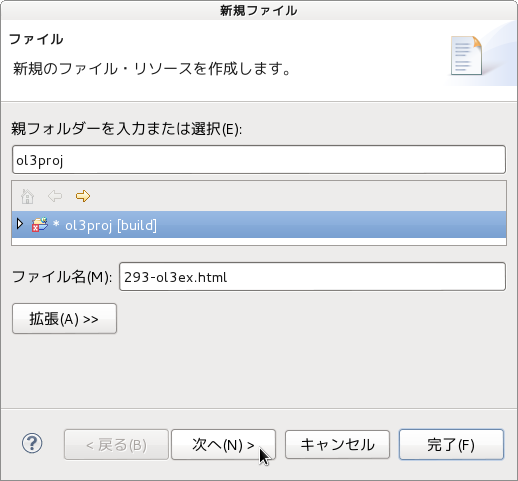
d 「ファイル」ウィンドウで「ol3proj」をクリックして選択し、「ファイル名」を「293-ol3ex.html」と入力し、「次へ」ボタンをクリックします。


e 「File Template」ウィンドウで「HTML 5 Template」をクリックして選択し、「OK」ボタンをクリックします。


f 「canvas-tiles.html」の内容をコピーして「293-ol3ex.html」に貼り付け、修正します。
g 同じように、新規に「293-ol3ex.js」ファイルを作成し、「File Template」ウィンドウで「JavaScript Template」をクリックして選択し、「完了」ボタンをクリックして、「canvas-tiles.js」の内容をコピーして貼り付け、修正します。「canvas-tiles-require.js」も「293-ol3ex-require.js」に貼り付けます。


「293-ol3ex.html」
<!doctype html>
<html lang="en">
 <head>
  <meta charset="utf-8">
  <meta http-equiv="X-UA-Compatible" content="chrome=1">
  <meta name="viewport" content="initial-scale=1.0, user-scalable=no, width=device-width">
<!--
  <link rel="stylesheet" href="../css/ol.css" type="text/css">
  <link rel="stylesheet" href="../resources/bootstrap/css/bootstrap.min.css" type="text/css">
  <link rel="stylesheet" href="../resources/layout.css" type="text/css">
  <link rel="stylesheet" href="../resources/bootstrap/css/bootstrap-responsive.min.css" type="text/css">
-->
  <!-- ディレクトリ修正 -->
  <link rel="stylesheet" href="v3.3.0/css/ol.css" type="text/css">
  <link rel="stylesheet" href="v3.3.0/resources/bootstrap/css/bootstrap.min.css" type="text/css">
  <link rel="stylesheet" href="v3.3.0/resources/layout.css" type="text/css">
  <link rel="stylesheet" href="v3.3.0/resources/bootstrap/css/bootstrap-responsive.min.css" type="text/css">
  <title>Canvas tiles example</title>
 </head>
 <body>
  <!-- 
  bootstrap.min.css, bootstrap-responsive.min.css で設定されたセレクタを使用。
  -->
  <div class="navbar navbar-inverse navbar-fixed-top">
   <div class="navbar-inner">
    <div class="container">
     <!--
     <a class="brand" href="./"><img src="../resources/logo.png"> OpenLayers 3 Examples</a>
     -->
     <!-- ディレクトリ修正 -->
     <a class="brand" href="v3.3.0/examples/"><img src="v3.3.0/resources/logo.png"> OpenLayers 3 Examples</a>
    </div>
   </div>
  </div>
  <div class="container-fluid">
   <div class="row-fluid">
    <div class="span12">
     <div id="map" class="map"></div>
    </div>
   </div>
   <div class="row-fluid">
    <div class="span12">
    <h4 id="title">Canvas tiles example</h4>
     <p id="shortdesc">Renders tiles with coordinates for 
      debugging.</p>
     <div id="docs">
      <p>The black grid tiles are generated on the client 
       with an HTML5 canvas. Note that the tile coordinates 
       are ol3 normalized tile coordinates (origin bottom 
       left), not OSM tile coordinates (origin top left).</p>
      <!--
      <p>See the <a href="canvas-tiles.js" target="_blank">canvas-tiles.js source</a> 
       to see how this is done.</p>
      -->
      <!-- ファイル修正 -->
      <p>See the <a href="293-ol3ex.js" target="_blank">293-ol3ex.js source</a> 
       to see how this is done.</p>
     </div>
     <div id="tags">layers, openstreetmap, canvas canvas, 
      sync, object</div>
    </div>
   </div>
  </div>
  <!--
  <script src="../resources/jquery.min.js" type="text/javascript"></script>
  <script src="../resources/example-behaviour.js" type="text/javascript"></script>
  -->
  <!-- ディレクトリ修正
   jQuery Minified版と
   example-behaviour.js(Examples用 JSコード[文字コードなど])
  -->
  <script src="v3.3.0/resources/jquery.min.js" type="text/javascript"></script>
  <script src="v3.3.0/resources/example-behaviour.js" type="text/javascript"></script>
  <!--
  <script src="loader.js?id=canvas-tiles" type="text/javascript"></script>
  -->
  <!-- ファイル修正 -->  <!-- ディレクトリ修正 -->
  <script src="loader.js?id=293-ol3ex" type="text/javascript"></script>
 </body>
</html>

2 - ol3.3ex 92b - Side-by-side example 2

「side-by-side.js(292-ol3ex.js)」は、マップを表示するための JavaScript ファイルです。

「292-ol3ex.js」
var domMap = new ol.Map({
 layers: [
  new ol.layer.Tile({
   source: new ol.source.MapQuest({layer: 'sat'})
   /** ol.source.MapQuest
    * Layer source for the MapQuest tile server.
    * MapQuest タイルサーバのレイヤソース。(ol3 API
    * 2 - ol3ex 23b - MapQuest example 2 参照)
    */
  })
 ],
 renderer: 'dom',
 target: 'domMap',
 view: new ol.View({
  center: [0, 0],
  zoom: 1
 })
});
if (ol.has.WEBGL) {
/** ol.has.WEBGL{boolean}
 * True if browser supports WebGL.
 * ブラウザが WebGL をサポートしていたら true。(ol3 API)
 */
 var webglMap = new ol.Map({
  renderer: 'webgl',
  target: 'webglMap'
 });
 webglMap.bindTo('layergroup', domMap);
 /** bindTo()
  * The bindTo method allows you to set up a two-way 
  * binding between a `source` and `target` object. 
  * The method returns an object with a `transform` 
  * method that you can use to provide `from` and 
  * `to` functions to transform values on the way 
  * from the source to the target and on the way back.
  * bindTo メソッドは、`source` と ` target` オブジェク
  * ト間の結合を双方向に設定することができます。メソッドは、
  * ソースからターゲットに、および、その逆方向に値を変換
  * する、 `from` と ` to` ファンクションを提供するため
  * に使用することがでる `transform` メソッドをともなっ
  * た、オブジェクトを返します。
  * (ol3 API[説明は Stable Only のチェックを外すと表示])
  */
 webglMap.bindTo('view', domMap);
} else {
 var info = document.getElementById('no-webgl');
 /**
  * display error message
  */
 info.style.display = '';
}
var canvasMap = new ol.Map({
 target: 'canvasMap'
});
canvasMap.bindTo('layergroup', domMap);
canvasMap.bindTo('view', domMap);

2 - ol3.3ex 92a - Side-by-side example 1

「Side-by-side example (side-by-side.html)」を参考に地図を表示してみます。

HTML ファイルの作成
a Eclipse のメニューの「ファイル」->「ファイルを開く」をクリックします。


b 「ファイルを開く」ウィンドウで、「user」->「mapsite」->「ol3proj」->「v3.3.0」->「examples」->「side-by-side.html」をクリックして選択し、「OK」ボタンをクリックします。
同じように「side-by-side.js」を開きます。


c メニューの「ファイル」->「新規」 -> 「ファイル」をクリックします。


d 「ファイル」ウィンドウで「ol3proj」をクリックして選択し、「ファイル名」を「292-ol3ex.html」と入力し、「次へ」ボタンをクリックします。


e 「File Template」ウィンドウで「HTML 5 Template」をクリックして選択し、「OK」ボタンをクリックします。


f 「side-by-side.html」の内容をコピーして「292-ol3ex.html」に貼り付け、修正します。
g 同じように、新規に「292-ol3ex.js」ファイルを作成し、「File Template」ウィンドウで「JavaScript Template」をクリックして選択し、「完了」ボタンをクリックして、「side-by-side.js」の内容をコピーして貼り付け、修正します。「side-by-side-require.js」も「292-ol3ex-require.js」に貼り付けます。


「292-ol3ex.html」
<!doctype html>
<html lang="en">
 <head>
  <meta charset="utf-8">
  <meta http-equiv="X-UA-Compatible" content="chrome=1">
  <meta name="viewport" content="initial-scale=1.0, user-scalable=no, width=device-width">
<!--
  <link rel="stylesheet" href="../css/ol.css" type="text/css">
  <link rel="stylesheet" href="../resources/bootstrap/css/bootstrap.min.css" type="text/css">
  <link rel="stylesheet" href="../resources/layout.css" type="text/css">
  <link rel="stylesheet" href="../resources/bootstrap/css/bootstrap-responsive.min.css" type="text/css">
-->
  <!-- ディレクトリ修正 -->
  <link rel="stylesheet" href="v3.3.0/css/ol.css" type="text/css">
  <link rel="stylesheet" href="v3.3.0/resources/bootstrap/css/bootstrap.min.css" type="text/css">
  <link rel="stylesheet" href="v3.3.0/resources/layout.css" type="text/css">
  <link rel="stylesheet" href="v3.3.0/resources/bootstrap/css/bootstrap-responsive.min.css" type="text/css">
  <title>Side-by-side example</title>
 </head>
 <body>
  <!-- 
  bootstrap.min.css, bootstrap-responsive.min.css で設定されたセレクタを使用。
  -->
  <div class="navbar navbar-inverse navbar-fixed-top">
   <div class="navbar-inner">
    <div class="container">
     <!--
     <a class="brand" href="./"><img src="../resources/logo.png"> OpenLayers 3 Examples</a>
     -->
     <!-- ディレクトリ修正 -->
     <a class="brand" href="v3.3.0/examples/"><img src="v3.3.0/resources/logo.png"> OpenLayers 3 Examples</a>
    </div>
   </div>
  </div>
  <div class="container-fluid">
   <div class="row-fluid">
    <div class="span4">
     <h4>Canvas</h4>
     <div id="canvasMap" class="map"></div>
     <div id="no-webgl" class="alert alert-error" style="display: none">
      This map requires a browser that supports 
       <a href="http://get.webgl.org/">WebGL</a>.
     </div>
    </div>
    <div class="span4">
     <h4>WebGL</h4>
     <div id="webglMap" class="map"></div>
    </div>
    <div class="span4">
     <h4>DOM</h4>
     <div id="domMap" class="map"></div>
    </div>
   </div>
   <div id="no-webgl" class="alert alert-error" style="display: none">
    This example requires a browser that supports 
    <a href="http://get.webgl.org/">WebGL</a>.
   </div>
   <div class="row-fluid">
    <div class="span12">
    <h4 id="title">Side-by-side example</h4>
     <p id="shortdesc">The three maps, one WebGL, one Canvas, 
      one DOM, share the same center, resolution, rotation 
      and layers.</p>
     <div id="docs">
      <!--
      <p>See the <a href="side-by-side.js" target="_blank">side-by-side.js source</a> 
       to see how this is done.</p>
      -->
      <!-- ファイル修正 -->
      <p>See the <a href="292-ol3ex.js" target="_blank">292-ol3ex.js source</a> 
       to see how this is done.</p>
     </div>
     <div id="tags">side-by-side, canvas, webgl, dom, 
      canvas, sync, object</div>
    </div>
   </div>
  </div>
  <!--
  <script src="../resources/jquery.min.js" type="text/javascript"></script>
  <script src="../resources/example-behaviour.js" type="text/javascript"></script>
  -->
  <!-- ディレクトリ修正
   jQuery Minified版と
   example-behaviour.js(Examples用 JSコード[文字コードなど])
  -->
  <script src="v3.3.0/resources/jquery.min.js" type="text/javascript"></script>
  <script src="v3.3.0/resources/example-behaviour.js" type="text/javascript"></script>
  <!--
  <script src="loader.js?id=side-by-side" type="text/javascript"></script>
  -->
  <!-- ファイル修正 -->  <!-- ディレクトリ修正 -->
  <script src="loader.js?id=292-ol3ex" type="text/javascript"></script>
 </body>
</html>