ラベル earthquakes の投稿を表示しています。 すべての投稿を表示

2015年12月31日木曜日

2 - ol3.12ex 144b - Earthquakes with custom symbols 2

「earthquake-custom-symbol.js(2144-ol3ex.js)」は、マップを表示するための JavaScript ファイルです。

「2144-ol3ex.js」
var styleCache = {};
var styleFunction = function(feature, resolution) {
 // 2012_Earthquakes_Mag5.kml stores the magnitude 
 // of each earthquake in a standards-violating 
 //  tag in each Placemark.  We extract 
 // it from the Placemark's name instead.
 // 2012_Earthquakes_Mag5.kml は、各 Placemark の
 // 標準規格に違反する  に各 earthqu8ake の 
 // magnitude を格納します。代わりにそれを Placemark の 
 // name から抽出します。
 var name = feature.get('name');
 /** get(key)
  * Gets a value.(ol3 API)
  */
 var magnitude = parseFloat(name.substr(2));
 /** parseFloat()
  *引数として与えられた文字列を解析し、浮動小数点数を返します。
  * (MDN[https://developer.mozilla.org/ja/docs/Web/
  * JavaScript/Reference/Global_Objects/parseFloat])
  */
 /** String.prototype.substr()
  * The substr() method returns the characters in a 
  * string beginning at the specified location 
  * through the specified number of characters.
  * substr()メソッドは、文字列内の指定した位置から始まり、
  * 指定した文字数のまでの文字を返します。
  * (MDN[https://developer.mozilla.org/en-US/docs/Web/
  * JavaScript/Reference/Global_Objects/String/substr])
  */
 var size = parseInt(10 + 40 * (magnitude - 5), 10);
 /** parseInt(string, radix)
  * str: 文字列, radix: 基数(進法)
  * 文字列の引数をパースし、指定された基数の整数を返します。
  * (MDN[https://developer.mozilla.org/ja/docs/Web/
  * JavaScript/Reference/Global_Objects/parseInt])
  */
 var style = styleCache[size];
  if (!style) {
   var canvas =
    /** @type {HTMLCanvasElement} */ (document.createElement('canvas'));
    /** 「@type」 
     * 値のタイプ(型)の説明 - 式などで表示
     * (@use JSDoc[http://usejsdoc.org/]より)
     */
   var render = ol.render.toContext(
   /** ol.render.toContext(context, opt_options)
    * Binds a Canvas Immediate API to a canvas context, 
    * to allow drawing geometries to the context's 
    * canvas.
    * The units for geometry coordinates are css pixels 
    * relative to the top left corner of the canvas 
    * element.
    * Note that ol.render.canvas.Immediate#drawAsync 
    * and ol.render.canvas.Immediate#drawFeature 
    * cannot be used.
    * コンテキストのキャンバス(canvas)にジオメトリを描画でき
    * るように、Canvas Immediate API をキャンバスコンテキス
    * ト(canvas context)にバインドします。
    * ジオメトリの座標の単位は canvas 要素の左上隅からの相対 
    * css ピクセルです。
    * ol.render.canvas.Immediate#drawAsynと
    * ol.render.canvas.Immediate#drawFeature は使用出来
    * ないことに注意してください。
    * (ol3 API[説明は Stable Only のチェックを外すと表示])
    */
    /** @type {CanvasRenderingContext2D} */ (canvas.getContext('2d')),
    /** HTMLCanvasElement.getContext()
     * The HTMLCanvasElement.getContext() method returns a 
     * drawing context on the canvas, or null if the 
     * context identifier is not supported.
     * HTMLCanvasElement.getContext()メソッドは、キャンバ
     * ス上の描画コンテキストを返すか、または コンテキスト識別
     * 子がサポートされていない場合、null を返します。
     * contextType Is a DOMString containing the context 
     * identifier defining the drawing context associated 
     * to the canvas.
     * "2d", leading to the creation of a 
     * CanvasRenderingContext2D object representing a 
     * two-dimensional rendering context.
     * contextTypeは canvas に関連する描画コンテキストを定義
     * するコンテキスト識別子を含む DOMString  です。
     * 「2D」、二次元のレンダリングコンテキストを表す
     * CanvasRenderingContext2D オブジェクトの作成につなが
     * ります。
     * (MDN[https://developer.mozilla.org/en-US/docs/Web/
     * API/HTMLCanvasElement/getContext])
     */
    {size: [size + 2, size + 2], pixelRatio: size / 10});
    /** size:
     * Desired size of the canvas in css pixels. When 
     * provided, both canvas and css size will be set 
     * according to the pixelRatio. If not provided, the 
     * current canvas and css sizes will not be altered.
     * css ピクセル単位の canvas の希望のサイズ。提供される場
     * 合、canvas とcss サイズ両方とも画素比率に応じて設定され
     * ます。提供されていない場合は、現在の canvas と css のサ
     * イズは変更されません。
     * (ol3 API[説明は Stable Only のチェックを外すと表示])
     */
    /** pixelRatio:
     * Pixel ratio (canvas pixel to css pixel ratio) for 
     * the canvas. Default is the detected device pixel 
     * ratio.
     * canvas 用のピクセル比(css ピクセル比のためのcanvas 
     * ピクセル)。デフォルトは、検出されたデバイスピクセル比
     * です。
     * (ol3 API[説明は Stable Only のチェックを外すと表示])
     */
   render.setFillStrokeStyle(
   /** setFillStrokeStyle(fillStyle, strokeStyle)
    * Set the fill and stroke style for subsequent draw 
    * operations. To clear either fill or stroke styles, 
    * pass null for the appropriate parameter.
    * 後の描画操作のための塗りと線のスタイルを設定します。塗り
    * または線のスタイルのいずれかをクリアするために、適切なパ
    * ラメータに null を渡します。
    * (ol3 API[説明は Stable Only のチェックを外すと表示])
    */
    new ol.style.Fill({ color: 'rgba(255, 153, 0, 0.4)' }),
    /** ol.style.Fill 
     * Set fill style for vector features.
     * ベクタフィーチャの塗りつぶしスタイルを設定。
     * (ol3 API[説明は Stable Only のチェックを外すと表示])
     */
    new ol.style.Stroke({ color: 'rgba(255, 204, 0, 0.2)', width: 1 }));
    /** ol.style.Stroke 
     * Set stroke style for vector features. 
     * Note that the defaults given are the Canvas defaults, 
     * which will be used if option is not defined. 
     * The get functions return whatever was entered 
     * in the options;  they will not return the default.
     * ベクタフィーチャのためのストロークスタイルの設定。
     * デフォルトは、オプションが定義されていない場合に使用さ
     * れる Canvas のデフォルトを与えられることに注意してくだ
     * さい。GET 関数は、オプションで入力されたものはすべて返
     * す。それらはデフォルトを返しません。
     * (ol3 API[説明は Stable Only のチェックを外すと表示])
    */
   render.drawPolygonGeometry(new ol.geom.Polygon(
   /** drawPolygonGeometry(polygonGeometry)
    * Render a Polygon geometry into the canvas. 
    * Rendering is immediate and uses the current style.
    * キャンバス(canvas)にポリゴンジオメトリ(Polygon 
    * geometry)をレンダリングします。レンダリングは即時であ
    * り、現在のスタイルを使用します。
    * (ol3 API[説明は Stable Only のチェックを外すと表示])
    */
   /** ol.geom.Polygon
    * Polygon geometry.(ol3 API)
    */
     [[[0, 0], [4, 2], [6, 0], [10, 5], [6, 3], [4, 5], [0, 0]]]));
   style = new ol.style.Style({
   /** ol.style.Style 
    * Container for vector feature rendering styles. Any 
    * changes made to the style or its children through 
    * set*() methods will not take effect until the feature 
    * or layer that uses the style is re-rendered.
    * ベクタフィーチャがスタイルを描画するためのコンテナ。
    * スタイルや set*() メソッドを通じてその子に加えられた変
    * 更は、スタイルを使用するフィーチャまたはレイヤが再レン
    * ダリングされるまで有効になりません。
    * (ol3 API[説明は Stable Only のチェックを外すと表示])
    */
    image: new ol.style.Icon({
    /** ol.style.Icon 
     * Set icon style for vector features.
     * ベクタフィーチャのアイコンスタイルを設定します。
     * (ol3 API[説明は Stable Only のチェックを外すと表示])
     */
     img: canvas,
     /** img:
      * Image object for the icon. If the src option is 
      * not provided then the provided image must already 
      * be loaded. And in that case, it is required to 
      * provide the size of the image, with the imgSize 
      * option.
      * アイコンの画像(image)オブジェクト。 src オプション
      * が提供されていない場合では、提供される画像は、すでに
      * ロードされている必要があります。その場合には、imgSize 
      * オプションを使用して、画像の大きさを提供するために必
      * 要です。
      * (ol3 API[説明は Stable Only のチェックを外すと表示])
      */
     imgSize: [canvas.width, canvas.height],
     /** imgSize:
      * Image size in pixel. Only required if img is set 
      * and src is not.
      * 画素単位の画像サイズ。img が設定され、src がされてな
      * い場合にのみ必要です。
      * (ol3 API[説明は Stable Only のチェックを外すと表示])
      */
     rotation: 1.2
     /**rotation: 
      * Rotation in radians (positive rotation clockwise). 
      * Default is 0.
      * ラジアン単位の回転(時計回り)。デフォルトは、0。
      * (ol3 API[説明は Stable Only のチェックを外すと表示])
      */
    })
   });
   styleCache[size] = style;
  }
 return style;
};
var vector = new ol.layer.Vector({
/** ol.layer.Vector
 * Vector data that is rendered client-side.
 * クライアント側で描画されたベクタデータ。(ol3 API)
 */
 source: new ol.source.Vector({
 /** ol.source.Vector
  * Provides a source of features for vector layers. 
  * Vector features provided by this source are 
  * suitable for editing. See ol.source.VectorTile for 
  * vector data that is optimized for rendering.
  * ベクタレイヤのフィーチャのソースを用意します。このソース
  * が提供するベクタフィーチャは、編集に適しています。レンダ
  * リングのために最適化されたベクタデータの 
  * ol.source.VectorTile を参照してください。(ol3 API)
  */
  // url: 'data/kml/2012_Earthquakes_Mag5.kml',
  url: 'v3.12.1/examples/data/kml/2012_Earthquakes_Mag5.kml',
  /** url:
   * Setting this option instructs the source to use an 
   * XHR loader (see ol.featureloader.xhr). Use a 
   * string and an ol.loadingstrategy.all for a one-off 
   * download of all features from the given URL. Use a 
   * ol.FeatureUrlFunction to generate the url with 
   * other loading strategies. Requires format to be 
   * set as well. When default XHR feature loader is 
   * provided, the features will be transformed from 
   * the data projection to the view projection during 
   * parsing. If your remote data source does not 
   * advertise its projection properly, this 
   * transformation will be incorrect. For some formats, 
   * the default projection (usually EPSG:4326) can be 
   * overridden by setting the defaultDataProjection 
   * constructor option on the format.
   * このオプションを設定することは、XHR ローダーを使用する
   * ソースを指示します(ol.featureloader.xhr 参照)。指
   * 定された URL からすべてのフィーチャの一回限りのダウン
   * ロードのために文字列とol.loadingstrategy.all を使用
   * してください。他のロードストラテジと URL を生成するため
   * に ol.FeatureURLFunction を使用してください。フォー
   * マットも同様に設定する必要があります。デフォルトの XHR 
   * フィーチャローダが提供される場合、フィーチャは解析中に
   * データ投影からビュー投影へ変換されます。リモート・データ
   * ・ソースが適切に投影をアドバタイズしていない場合、この変
   * 換は不正確になります。いくつかのフォーマットについては、
   * デフォルトの投影(通常はEPSG:4326)は、フォーマットの 
   * defaultDataProjection コンストラクタオプションを設
   * 定することで上書きすることができます。
   * (ol3 API[説明は Stable Only のチェックを外すと表示])
   */
  format: new ol.format.KML({
  /** format:
   * The feature format used by the XHR feature loader 
   * when url is set. Required if url is set, otherwise 
   * ignored. Default is undefined.
   * URL が設定されている場合に XHR フィーチャローダによって
   * 使用されるフィーチャフォーマット。 URLが設定されている場
   * 合は必要です、それ以外の場合は無視されます。デフォルトは
   * 未定義です。
   * (ol3 API[説明は Stable Only のチェックを外すと表示])
   */
  /** ol.format.KML 
   * Feature format for reading and writing data 
   * in the KML format.
   * KML フォーマットでデータを読み書きするためのフィー
   * チャのフォーマット。(ol3 API)
   */
   extractStyles: false
   /** extractStyles
    * Extract styles from the KML. Default is true.
    * KML からの外部スタイル。デフォルトはあ、true。
    * (ol3 API)
    */
  })
 }),
 style: styleFunction
 /** style:
  * Layer style. See ol.style for default style which 
  * will be used if this is not defined.
  * レイヤースタイル。これが定義されていない場合に使用される
  * デフォルトのスタイルに対する ol.style を参照してくださ
  * い。(ol3 API)
  */
});
var raster = new ol.layer.Tile({
/** ol.layer.Tile 
 * For layer sources that provide pre-rendered, tiled 
 * images in grids that are organized by zoom levels for 
 * specific resolutions. 
 * プリレンダリング(事前描画)を提供するレイヤソースのため
 * の、特定の解像度でのズームレベルによって編成されているグ
 * リッドのタイルイメージ。(ol3 API)
 */
 source: new ol.source.Stamen({
 /** ol.source.Stamen
  * Layer source for the Stamen tile server.
  * Stamen タイルサーバのレイヤソース。(ol3 API)
  * (2 - ol3ex 24b - Stamen example 1 参照)
  */
  layer: 'toner'
 })
});
var map = new ol.Map({
 layers: [raster, vector],
 target: 'map',
 view: new ol.View({
  center: [0, 0],
  zoom: 2
 })
});

2 - ol3.12ex 144a - Earthquakes with custom symbols 1

「Earthquakes with custom symbols (earthquake-custom-symbol.html)」を参考に地図を表示してみます。
説明に次のようにあります。

This example parses a KML file and renders the features as a vector layer. The layer is given a style that renders earthquake locations with a custom lightning symbol and a size relative to their magnitude.

この例では、KMLファイルを解析し、ベクトルレイヤなどのフィーチャをレンダリングします。レイヤは、カスタム稲妻シンボルとその大きさに比例したサイズで地震の場所をレンダリングするスタイルを指定されます。


HTML ファイルの作成
a Eclipse のメニューの「ファイル」->「ファイルを開く」をクリックします。


b 「ファイルを開く」ウィンドウで、「user」->「mapsite」->「ol3proj」->「v3.12.1」->「examples」->「earthquake-custom-symbol.html」をクリックして選択し、「OK」ボタンをクリックします。
同じように「earthquake-custom-symbol.js」を開きます。


c メニューの「ファイル」->「新規」 -> 「ファイル」をクリックします。


d 「ファイル」ウィンドウで「ol3proj」をクリックして選択し、「ファイル名」を「2144-ol3ex.html」と入力し、「次へ」ボタンをクリックします。


e 「File Template」ウィンドウで「HTML 5 Template」をクリックして選択し、「OK」ボタンをクリックします。


f 「earthquake-custom-symbol.html」の内容をコピーして「2144-ol3ex.html」に貼り付け、修正します。
g 同じように、新規に「2144-ol3ex.js」ファイルを作成し、「File Template」ウィンドウで「JavaScript Template」をクリックして選択し、「完了」ボタンをクリックして、「earthquake-custom-symbol.js」の内容をコピーして貼り付け、修正します。「earthquake-custom-symbol-require.js」も「2144-ol3ex-require.js」に貼り付けます。

「2144-ol3ex.html」
<!doctype html>
<html lang="en">
 <head>
  <meta charset="utf-8">
  <meta http-equiv="X-UA-Compatible" content="chrome=1">
  <meta name="viewport" content="initial-scale=1.0, user-scalable=no, width=device-width">
  <link rel="stylesheet" href="http://maxcdn.bootstrapcdn.com/font-awesome/4.4.0/css/font-awesome.min.css" type="text/css">
  <link rel="stylesheet" href="http://maxcdn.bootstrapcdn.com/bootstrap/3.3.5/css/bootstrap-combined.min.css" type="text/css">
  <!--
  <link rel="stylesheet" href="../css/ol.css" type="text/css">
  <link rel="stylesheet" href="./resources/layout.css" type="text/css">

  <link rel="stylesheet" href="./resources/prism/prism.css" type="text/css">
  <script src="./resources/zeroclipboard/ZeroClipboard.min.js"></script>

  「resources」の位置が変わりました。
  -->
  <!-- ディレクトリ修正 -->
  <link rel="stylesheet" href="v3.12.1/css/ol.css" type="text/css">
  <link rel="stylesheet" href="v3.12.1/examples/resources/layout.css" type="text/css">

  <link rel="stylesheet" href="v3.12.1/examples/resources/prism/prism.css" type="text/css">
  <script src="v3.12.1/examples/resources/zeroclipboard/ZeroClipboard.min.js"></script>
  <script src="https://cdn.polyfill.io/v2/polyfill.min.js?features=fetch"></script>
  <title>Earthquakes with custom symbols</title>
 </head>
 <body>
  <!-- 
  bootstrap-combined.min.css, ol.css, layout.css,
  CSSファイルで設定されたセレクタを使用。
  -->
  <header class="navbar" role="navigation">
   <div class="container" id="navbar-inner-container">
    <!--
    <a class="navbar-brand" href="./"><img src="./resources/logo-70x70.png"> OpenLayers 3 Examples</a>
    -->
    <!-- ディレクトリ修正 -->
    <a class="navbar-brand" href="v3.12.1/examples/"><img src="v3.12.1/examples/resources/logo-70x70.png"> OpenLayers 3 Examples</a>
   </div>
  </header>
  <div class="container-fluid">
   <div class="row-fluid">
    <div class="span12">
     <h4 id="title">Earthquakes with custom symbols</h4>
     <div id="map" class="map"></div>
    </div>
   </div>
   <div class="row-fluid">
    <div class="span12">
     <p id="shortdesc">Demonstrates the use of 
      `ol.render.toCanvas` to create custom icon
      symbols.</p>
     <div id="docs"><p>This example parses a KML file and 
      renders the features as a vector layer.  The layer is 
      given a <code>style</code> that renders earthquake 
      locations with a custom lightning symbol and a size 
      relative to their magnitude.</p>
     </div>
     <div id="api-links">Related API documentation: 
      <ul class="inline">
       <li>
       <!-- <a href="../apidoc/ol.Map.html" title="API documentation for ol.Map">ol.Map</a> -->
       <a href="v3.12.1/apidoc/ol.Map.html" title="API documentation for ol.Map">ol.Map</a>
       </li>,
       <li>
        <!-- <a href="../apidoc/ol.View.html" title="API documentation for ol.View">ol.View</a> -->
        <a href="v3.12.1/apidoc/ol.View.html" title="API documentation for ol.View">ol.View</a>
       </li>,
       <li>
        <!-- <a href="../apidoc/ol.format.KML.html" title="API documentation for ol.format.KML">ol.format.KML</a> -->
        <a href="v3.12.1/apidoc/ol.format.KML.html" title="API documentation for ol.format.KML">ol.format.KML</a>
       </li>,
       <li>
        <!--<a href="../apidoc/ol.eom.Point.html" title="API documentation for ol.eom.Point">ol.eom.Point</a> -->
        <a href="v3.12.1/apidoc/ol.eom.Point.html" title="API documentation for ol.eom.Point">ol.eom.Point</a>
       </li>,
       <li>
        <!-- <a href="../apidoc/ol.layer.Tile.html" title="API documentation for ol.layer.Tile">ol.layer.Tile</a> -->
        <a href="v3.12.1/apidoc/ol.layer.Tile.html" title="API documentation for ol.layer.Tile">ol.layer.Tile</a>
       </li>,
       <li>
        <!-- <a href="../apidoc/ol.layer.Vector.html" title="API documentation for ol.layer.Vector">ol.layer.Vector</a> -->
        <a href="v3.12.1/apidoc/ol.layer.Vector.html" title="API documentation for ol.layer.Vector">ol.layer.Vector</a>
       </li>,
       <li>
        <!-- <a href="../apidoc/ol.render.html" title="API documentation for ol.render">ol.render</a> -->
        <a href="v3.12.1/apidoc/ol.render.html" title="API documentation for ol.render">ol.render</a>
       </li>,
       <li>
        <!-- <a href="../apidoc/ol.source.Stamen.html" title="API documentation for ol.source.Stamen">ol.source.Stamen</a> -->
        <a href="v3.12.1/apidoc/ol.source.Stamen.html" title="API documentation for ol.source.Stamen">ol.source.Stamen</a>
       </li>,
       <li>
        <!-- <a href="../apidoc/ol.source.Vector.html" title="API documentation for ol.source.Vector">ol.source.Vector</a> -->
        <a href="v3.12.1/apidoc/ol.source.Vector.html" title="API documentation for ol.source.Vector">ol.source.Vector</a>
       </li>,
       <li>
        <!-- <a href="../apidoc/ol.style.Fill.html" title="API documentation for ol.style.Fill">ol.style.Fill</a> -->
        <a href="v3.12.1/apidoc/ol.style.Fill.html" title="API documentation for ol.style.Fill">ol.style.Fill</a>
       </li>,
       <li>
        <!-- <a href="../apidoc/ol.style.Icon.html" title="API documentation for ol.style.Icon">ol.style.Icon</a> -->
        <a href="v3.12.1/apidoc/ol.style.Icon.html" title="API documentation for ol.style.Icon">ol.style.Icon</a>
       </li>,
       <li>
        <!-- <a href="../apidoc/ol.style.Stroke.html" title="API documentation for ol.style.Stroke">ol.style.Stroke</a> -->
        <a href="v3.12.1/apidoc/ol.style.Stroke.html" title="API documentation for ol.style.Stroke">ol.style.Stroke</a>
       </li>,
       <li>
        <!-- <a href="../apidoc/ol.style.Style.html" title="API documentation for ol.style.Style">ol.style.Style</a> -->
        <a href="v3.12.1/apidoc/ol.style.Style.html" title="API documentation for ol.style.Style">ol.style.Style</a>
       </li>
      </ui>
     </div>
    </div>
   </div>
   <div class="row-fluid">
    <div id="source-controls">
     <a id="copy-button">
      <i class="fa fa-clipboard"></i> Copy
     </a>
     <a id="jsfiddle-button">
      <i class="fa fa-jsfiddle"></i> Edit
     </a>
    </div>
    <form method="POST" id="jsfiddle-form" target="_blank" action="http://jsfiddle.net/api/post/jquery/1.11.0/">
    <textarea class="hidden" name="js">
// --- 省略 ---
&lt;/html&gt;</code></pre>
   </div>
  </div>
  <!--
  <script src="./resources/common.js"></script>
  <script src="./resources/prism/prism.min.js"></script>
  -->
  <!-- ディレクトリ修正
   CommonJS と
   prism.js
 -->
  <script src="v3.12.1/examples/resources/common.js"></script>
  <script src="v3.12.1/examples/resources/prism/prism.min.js"></script>
  <!-- 
  <script src="loader.js?id=earthquake-custom-symbol"></script>
  -->
  <!-- ファイル修正 -->  <!-- ディレクトリ修正 -->
  <script src="loader.js?id=2144-ol3ex"></script>
  </body>
</html>


COMMONJS は

COMMONJS
http://webpack.github.io/docs/commonjs.html

に、次のようにあります。

The CommonJS group defined a module format to solve JavaScript scope issues by making sure each module is executed in its own namespace.
This is achieved by forcing modules to explicitly export those variables it wants to expose to the “universe”, and also by defining those other modules required to properly work.
To achieve this CommonJS give you two tools:
the require() function, which allows to import a given module into the current scope.
the module object, which allows to export something from the current scope.

CommonJSグループは、それ自身の名前空間内で実行されている各モジュールを確認することによって、JavaScriptのスコープ問題を解決するためのモジュールフォーマットを定義しました。
これは、それが「universe(?)」に公開したい変数を明示的にエクスポートするモジュールを強制することによって、同じように、正常に動作するのに必要な他のモジュールを定義することによって、達成されます。
この CommonJS を達成するために2つのツールを与えます:
require()関数、指定したモジュールを現在のスコープにインポートすることができます。
モジュールオブジェクト、現在のスコープからエクスポートすることができます。


Prism は、

Prism
http://prismjs.com/

に、次のようにあります。

Prism is a lightweight, extensible syntax highlighter, built with modern web standards in mind. It’s a spin-off from Dabblet and is tested there daily by thousands.
Prismは、最新のWeb標準に構築されたことを考慮し軽量で拡張可能なシンタックスハイライトです。それは Dabblet からスピンオフで、何千人も日々そこで試験されています。


ZeroClipboard は

ZeroClipboard v2.x
http://zeroclipboard.org/

に、次のようにあります。

The ZeroClipboard library provides an easy way to copy text to the clipboard using an invisible Adobe Flash movie and a JavaScript interface.
ZeroClipboard ライブラリは、見えない Adobe Flash ムービーとJavaScript のインターフェイスを使用してテキストをクリップボードにコピーする簡単な方法を提供します。

Debian 8 では動作しませんでした。ボタンを右クリックしたときに flash のコンテキストメニューが表示されると動作しています。

2015年3月2日月曜日

2 - ol3.2ex 73b -Earthquake Clusters 2

「earthquake-clusters.js(273-ol3ex.js)」は、マップを表示するための JavaScript ファイルです。

「273-ol3ex.js」
var earthquakeFill = new ol.style.Fill({
/** ol.style.Fill 
 * Set fill style for vector features.
 * ベクタフィーチャの塗りつぶしスタイルを設定。(ol3 API)
 */
 color: 'rgba(255, 153, 0, 0.8)'
});
var earthquakeStroke = new ol.style.Stroke({
/** ol.style.Stroke 
 * Set stroke style for vector features. 
 * Note that the defaults given are the Canvas defaults, 
 * which will be used if option is not defined. 
 * The get functions return whatever was entered 
 * in the options;  they will not return the default.
 * ベクタフィーチャのためのストロークスタイルの設定。
 * デフォルトは、オプションが定義されていない場合に使用される
 * Canvas のデフォルトを与えられることに注意してください。 
 * GET関数は、オプションで入力されたものはすべて返します。
 * それらはデフォルトを返しません。(ol3 API)
 */
 color: 'rgba(255, 204, 0, 0.2)',
 width: 1
});
var textFill = new ol.style.Fill({
 color: '#fff'
});
var textStroke = new ol.style.Stroke({
 color: 'rgba(0, 0, 0, 0.6)',
 width: 3
});
var invisibleFill = new ol.style.Fill({
 color: 'rgba(255, 255, 255, 0.01)'
});
function createEarthquakeStyle(feature) {
/** 2012_Earthquakes_Mag5.kml stores the magnitude 
 * of each earthquake in a standards-violating 
 * <magnitude> tag in each Placemark.  We extract 
 * it from the Placemark's name instead.
 * 2012_Earthquakes_Mag5.kml は、ぞれぞれの Placemark 
 * にある標準規格に違反する  <magnitude> タグのぞれぞれの
 * 地震のマグニチュードを格納しています。代わりに Placemark 
 * の名前からそれを抽出します。
 */
 var name = feature.get('name');
 /** get(key)
  * Gets a value.
  * (ol3 API[説明は Stable Only のチェックを外すと表示])
  */
 var magnitude = parseFloat(name.substr(2));
 /** parseFloat()
  * 引数として与えられた文字列を解析し、浮動小数点数を返します。
  * (MDN[https://developer.mozilla.org/ja/docs/Web/
  * JavaScript/Reference/Global_Objects/parseFloat])
  */
 /** String.prototype.substr()
  * The substr() method returns the characters in a 
  * string beginning at the specified location 
  * through the specified number of characters.
  * substr()メソッドは、文字列内の指定した位置から始まり、
  * 指定した文字数のまでの文字を返します。
  * (MDN[https://developer.mozilla.org/en-US/docs/Web/
  * JavaScript/Reference/Global_Objects/String/substr])
  */
 var radius = 5 + 20 * (magnitude - 5);
 return new ol.style.Style({
 /** ol.style.Style 
  * Base class for vector feature rendering styles.
  * ベクタフィーチャがスタイルを描画するための基本クラス。
  * (ol3 API)
  */
  geometry: feature.getGeometry(),
  /** getGeometry()
   * Returns the Geometry associated with this feature 
   * using the current geometry name property. By default, 
   * this is geometry but it may be changed by calling 
   * setGeometryName.
   * 現在のジオメトリネームプロパティを使用して、このフィーチャに
   * 関連したジオメトリを返します。デフォルトでは、ジオメトリです
   * が、setGeometryName を呼び出すことによって変更することがで
   * きます。(ol3 API)
   */
  image: new ol.style.RegularShape({
  /** ol.style.RegularShape
   * Set regular shape style for vector features. The 
   * resulting shape will be a regular polygon when 
   * radius is provided, or a star when radius1 and 
   * radius2 are provided.
   * ベクタフィーチャの規則的な形状のスタイルを設定します。生じた
   * 形状は、radius が提供されたとき正多角形になり、または、
   * radius1 と radius2 が提供されたとき星形になります。
   * (ol3 API)
   */
   radius1: radius,
   /** radius1:
    * Inner radius of a star.
    *(ol3 API[説明は Stable Only のチェックを外すと表示])
    */
   radius2: 3,
   /** radius2:
    * Outer radius of a star.
    *(ol3 API[説明は Stable Only のチェックを外すと表示])
    */
   points: 5,
   /** points:
    * Number of points for stars and regular polygons. 
    * In case of a polygon, the number of points is 
    * the number of sides.
    * 星形と正多角形の点の数。ポリゴンの場合、点の数は辺の数です。
    * (ol3 API[説明は Stable Only のチェックを外すと表示])
    */
   angle: Math.PI,
   /** angle:
    * Shape's angle in radians. A value of 0 will 
    * have one of the shape's point facing up. 
    * Default value is 0.
    * ラジウス単位の形状の角度。値 0 は、表を上にした一つの
    * 形状の点です。デフォル値は 0 です。
    * (ol3 API[説明は Stable Only のチェックを外すと表示])
    */
   /** Math.PI()
    * 円周率。約 3.14159 です。
    * (MDN[https://developer.mozilla.org/ja/docs/Web
    * /JavaScript/Reference/Global_Objects/Math/PI])
    */
   fill: earthquakeFill, // Fill style.(ol3 API)
   stroke: earthquakeStroke // Stroke style.(ol3 API)
  })
 });
}
var maxFeatureCount;
function calculateClusterInfo(resolution) {
 maxFeatureCount = 0;
 var features = vector.getSource().getFeatures();
 /** getSource()
  * Return: Source(al3 API)
  */
 /** getFeatures()
  * Get all features on the source.
  * ソース上のすべてのフィーチャを取得します。
  * Returns: Features.(al3 API)
  */
 var feature, radius;
 for (var i = features.length - 1; i >= 0; --i) {
  feature = features[i];
  var originalFeatures = feature.get('features');
  var extent = ol.extent.createEmpty();
  /** ol.extent.createEmpty
   * Returns: Empty extent.(al3 API)
   */
  for (var j = 0, jj = originalFeatures.length; j < jj; ++j) {
   ol.extent.extend(extent, originalFeatures[j].getGeometry().getExtent());
   /** ol.extent.extend(extent1, extent2)
    * Returns: Extent.(al3 API)
    */
   /** getExtent()
    * Get the extent of the geometry.
    * ジオメトリの範囲を取得します。(ol3 API)
    */
  }
  maxFeatureCount = Math.max(maxFeatureCount, jj);
  /** Math.max() 
   * 引数として与えた複数の数の中で最大の数を返します。
   * (MDN [https://developer.mozilla.org/ja/docs/Web/
   * JavaScript/Reference/Global_Objects/Math/max])
   */
  radius = 0.25 * (ol.extent.getWidth(extent) + ol.extent.getHeight(extent)) /
  /** ol.extent.getWidth(extent)
   * Return: Width.(ol3 API)
   */
  /** ol.extent.getHeight(extent)
   * Return: Height.(ol3 API)
   */
   resolution;
  feature.set('radius', radius);
  /** set(key, value)
   * Sets a value.
   * (ol3 API[説明は Stable Only のチェックを外すと表示])
   */
 }
}
var currentResolution;
function styleFunction(feature, resolution) {
 if (resolution != currentResolution) {
  calculateClusterInfo(resolution);
  currentResolution = resolution;
 }
 var style;
 var size = feature.get('features').length;
 if (size > 1) {
  style = [new ol.style.Style({
  /** ol.style.Style 
   * Base class for vector feature rendering styles.
   * ベクタフィーチャがスタイルを描画するための基本クラス。
   * (ol3 API)
   */
   image: new ol.style.Circle({
   /** ol.style.Circle
    * Set circle style for vector features.
    * ベクタフィーチャの円のスタイルを設定。(ol3 API)
    */
    radius: feature.get('radius'),
    fill: new ol.style.Fill({
     color: [255, 153, 0, Math.min(0.8, 0.4 + (size / maxFeatureCount))]
     /** Math.min() 
      * 引数として与えた複数の数の中で最小の数を返します。
      * (MDN [https://developer.mozilla.org/ja/docs/Web/
      * JavaScript/Reference/Global_Objects/Math/min])
      */
    })
   }),
   text: new ol.style.Text({
   /** ol.style.Text
    * Set text style for vector features.
    * ベクタフィーチャの文字列のスタイルを設定します。
    * (ol3 API)
    */
    text: size.toString(),
    /** Number.prototype.toString( [ radix ] )
     * 指定された Number オブジェクトを表す 文字列を返します。
     * radix: 数値を表すために使われる基数を指定する、2 から 
     * 36 までの整数。省略したときは 10。
     * MDN([https://developer.mozilla.org/ja/docs/Web/
     * JavaScript/Reference/Global_Objects/Number/toString])
     */
    fill: textFill,
    stroke: textStroke
   })
  })];
 } else {
  var originalFeature = feature.get('features')[0];
  style = [createEarthquakeStyle(originalFeature)];
 }
 return style;
}
function selectStyleFunction(feature, resolution) {
 var styles = [new ol.style.Style({
  image: new ol.style.Circle({
   radius: feature.get('radius'),
   fill: invisibleFill
  })
 })];
 var originalFeatures = feature.get('features');
 var originalFeature;
 for (var i = originalFeatures.length - 1; i >= 0; --i) {
  originalFeature = originalFeatures[i];
  styles.push(createEarthquakeStyle(originalFeature));
 /** push(elem)
  * Insert the provided element at the end of the 
  * collection.
  * コレクションの最後に供給されたエレメントに挿入します。
  * Name: elem, Type: T, Description: Element
  * (ol3 API)
  */
 }
 return styles;
}
var vector = new ol.layer.Vector({
/** ol.layer.Vector
 * Vector data that is rendered client-side.
 * クライアント側で描画されたベクタデータ。(ol3 API)
 */
 source: new ol.source.Cluster({
  distance: 40,
  /** distance
   * Minimum distance in pixels between clusters. 
   * Default is 20.
   * クラスタ間のピクセル単位の最短間隔。デフォルトは 20。
   *(ol3 API[説明は Stable Only のチェックを外すと表示]))
   */
  source: new ol.source.KML({
  /** ol.source.KML 
   * Static vector source in KML format
   * KML フォーマットの静的ベクタソース(0l3 API)
   */
   extractStyles: false,
   /** extractStyles:
    * Extract styles from the KML document. Default 
    * is true.
    * KML ドキュメントからの抽出スタイル。デフォrとは true。
    * (0l3 API)
    */
   projection: 'EPSG:3857',
   // url: 'data/kml/2012_Earthquakes_Mag5.kml'
   url: 'v3.2.1/examples/data/kml/2012_Earthquakes_Mag5.kml'
  })
 }),
 style: styleFunction
});
var raster = new ol.layer.Tile({
/** ol.layer.Tile 
 * For layer sources that provide pre-rendered, tiled 
 * images in grids that are organized by zoom levels for 
 * specific resolutions. 
 * プリレンダリング(事前描画)を提供するレイヤソースのための、
 * 特定の解像度でのズームレベルによって編成されているグリッドの
 * タイルイメージ。(ol3 API)
 */
 source: new ol.source.Stamen({
 /** ol.source.Stamen
  * Layer source for the Stamen tile server.
  * Steman タイルサーバのレイヤソース。(0l3 API)
  * (「2 - ol3ex 24b - Stamen example 2」
  * も参照してください。
  */
  layer: 'toner'
 })
});
var map = new ol.Map({
 layers: [raster, vector],
 interactions: ol.interaction.defaults().extend([new ol.interaction.Select({
 /** ol.interaction.defaults
  * Set of interactions included in maps by default. 
  * Specific interactions can be excluded by setting 
  * the appropriate option to false in the constructor 
  * options, but the order of the interactions is fixed. 
  * If you want to specify a different order for 
  * interactions, you will need to create your own 
  * ol.interaction.Interaction instances and insert 
  * them into a ol.Collection in the order you want 
  * before creating your ol.Map instance.
  * デフォルトでマップに含まれるインターラクションのセット。
  * 具体的なインターラクションは、コンストラクタのオプションで
  * 適切なオプションをfalseに設定することで除外することができます
  * が、インターラクションの順番は固定されています。インターラク
  * ションに対して別の順番を指定したい場合は、独自の
  * ol.interaction.Interaction インスタンスを作成し、ol.Map
  *  インスタンスを作成する前に望む順番で ol.Collection にそれら
  * を挿入する必要があります。(ol3 API)
  *  (訳注:インターラクションの順番は、API を参照してください。)
  */
 /** ol.interaction.Select 
  * Handles selection of vector data. A 
  * ol.FeatureOverlay is maintained internally to 
  * store the selected feature(s). Which features 
  * are selected is determined by the condition 
  * option, and optionally the toggle or add/remove 
  * options.
  * ベクタデータの選択を処理します。 ol.FeatureOverlay 
  * は、選択したフィーチャを格納するために内部的に維持され
  * ています。選択されているどのフィーチャでも条件オプショ
  * ン、そして部分的にトグルまたは追加/削除オプションによっ
  * て決定されます。(ol3 API)
  */
  condition: function(evt) {
   return evt.originalEvent.type == 'mousemove' ||
    evt.type == 'singleclick';
  },
  style: selectStyleFunction
 })]),
 target: 'map',
 view: new ol.View({
  center: [0, 0],
  zoom: 2
 })
});

2 - ol3.2ex 73a - Earthquake Clusters 1

「Earthquake Clusters (earthquake-clusters.html)」を参考に地図を表示してみます。
説明に次のようにあります。

Demonstrates the use of style geometries to render source features of a cluster.
This example parses a KML file and renders the features as clusters on a vector layer. The styling in this example is quite involved. Single earthquake locations (rendered as stars) have a size relative to their magnitude. Clusters have an opacity relative to the number of features in the cluster, and a size that represents the extent of the features that make up the cluster. When clicking or hovering on a cluster, the individual features that make up the cluster will be shown.
To achieve this, we make heavy use of style functions and ol.style.Style#geometry.

クラスタのソースフィーチャをレンダリングするスタイルジオメトリの使用方法を示します。
この例では、KMLファイルを解析し、ベクタレイヤ上のクラスタとしてフィーチャをレンダリングします。この例のスタイリングは非常に複雑です。 単一の地震の場所(星としてレンダリング)は、マグニチュードに比例したサイズを持っています。クラスタは、クラスタ内のフィーチャの数に比例した不透明度、および、クラスタを構成するフィーチャの範囲を表すサイズを持っています。クリックするか、クラスタ上でホバリングすると、クラスタを構成する個々のフィーチャが表示されます。
これを達成するために、スタイル関数と ol.style.Style#geometry を多用使用します


HTML ファイルの作成
a Eclipse のメニューの「ファイル」->「ファイルを開く」をクリックします。


b 「ファイルを開く」ウィンドウで、「user」->「mapsite」->「ol3proj」->「v3.2.1」->「examples」->「earthquake-clusters.html」をクリックして選択し、「OK」ボタンをクリックします。
同じように「earthquake-clusters.js」を開きます。


c メニューの「ファイル」->「新規」 -> 「ファイル」をクリックします。


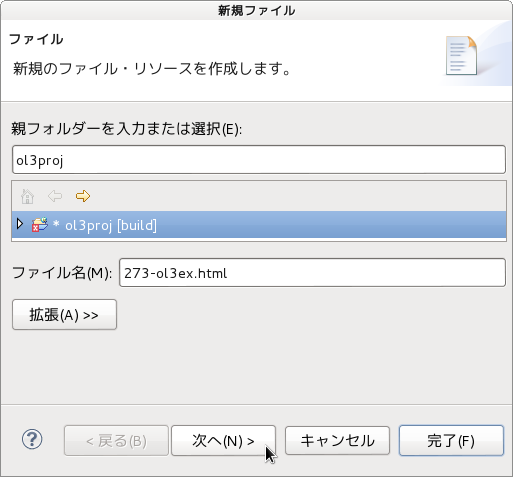
d 「ファイル」ウィンドウで「ol3proj」をクリックして選択し、「ファイル名」を「273-ol3ex.html」と入力し、「次へ」ボタンをクリックします。


e 「File Template」ウィンドウで「HTML 5 Template」をクリックして選択し、「OK」ボタンをクリックします。


f 「earthquake-clusters.html」の内容をコピーして「273-ol3ex.html」に貼り付け、修正します。
g 同じように、新規に「273-ol3ex.js」ファイルを作成し、「File Template」ウィンドウで「JavaScript Template」をクリックして選択し、「完了」ボタンをクリックして、「earthquake-clusters.js」の内容をコピーして貼り付け、修正します。「earthquake-clusters-require.js」も「273-ol3ex-require.js」に貼り付けます。


「273-ol3ex.html」
<!doctype html>
<html lang="en">
 <head>
  <meta charset="utf-8">
  <meta http-equiv="X-UA-Compatible" content="chrome=1">
  <meta name="viewport" content="initial-scale=1.0, user-scalable=no, width=device-width">
<!--
  <link rel="stylesheet" href="../css/ol.css" type="text/css">
  <link rel="stylesheet" href="../resources/bootstrap/css/bootstrap.min.css" type="text/css">
  <link rel="stylesheet" href="../resources/layout.css" type="text/css">
  <link rel="stylesheet" href="../resources/bootstrap/css/bootstrap-responsive.min.css" type="text/css">
-->
  <!-- ディレクトリ修正 -->
  <link rel="stylesheet" href="v3.2.1/css/ol.css" type="text/css">
  <link rel="stylesheet" href="v3.2.1/resources/bootstrap/css/bootstrap.min.css" type="text/css">
  <link rel="stylesheet" href="v3.2.1/resources/layout.css" type="text/css">
  <link rel="stylesheet" href="v3.2.1/resources/bootstrap/css/bootstrap-responsive.min.css" type="text/css">
  <title>Earthquake Clusters</title>
  <style>
   #map {
    position: relative;
   }
   #info {
    position: absolute;
    height: 1px;
    width: 1px;
    z-index: 100;
   }
   .tooltip.in {
    opacity: 1;
    filter: alpha(opacity=100);
   }
   .tooltip.top .tooltip-arrow {
    border-top-color: white;
   }
   .tooltip-inner {
    border: 2px solid white;
   }
  </style>
 </head>
 <body>
  <!-- 
  bootstrap.min.css, bootstrap-responsive.min.css で設定されたセレクタを使用。
  -->
  <div class="navbar navbar-inverse navbar-fixed-top">
   <div class="navbar-inner">
    <div class="container">
     <!--
     <a class="brand" href="./"><img src="../resources/logo.png"> OpenLayers 3 Examples</a>
     -->
     <!-- ディレクトリ修正 -->
     <a class="brand" href="v3.2.1/examples/"><img src="v3.2.1/resources/logo.png"> OpenLayers 3 Examples</a>
    </div>
   </div>
  </div>
  <div class="container-fluid">
   <div class="row-fluid">
    <div class="span12">
     <div id="map" class="map"></div>
    </div>
   </div>
   <div class="row-fluid">
    <div class="span12">
    <h4 id="title">Earthquake Clusters</h4>
     <p id="shortdesc">Demonstrates the use of style 
      geometries to render source features of a cluster.</p>
     <div id="docs">
      <p>This example parses a KML file and renders the 
      features as clusters on a vector layer.  The styling in 
      this example is quite involved. Single earthquake locations 
      (rendered as stars) have a size relative to their magnitude. 
      Clusters have an opacity relative to the number of features 
      in the cluster, and a size that represents the extent of 
      the features that make up the cluster. When clicking or 
      hovering on a cluster, the individual features that make 
      up the cluster will be shown.</p>
      <p>To achieve this, we make heavy use of style 
      functions and 
      <code>ol.style.Style#geometry</code>. </p>
      <!--
      <p>See the <a href="earthquake-clusters.js" target="_blank">earthquake-clusters.js source</a> to see how this is done.</p>
      -->
      <!-- ファイル修正 -->
      <p>See the <a href="273-ol3ex.js" target="_blank">273-ol3ex.js source</a> to see how this is done.</p>
     </div>
     <div id="tags">KML, vector, style, geometry, cluster</div>
    </div>
   </div>
  </div>
  <!--
  <script src="../resources/jquery.min.js" type="text/javascript"></script>
  <script src="../resources/bootstrap/js/bootstrap.min.js" type="text/javascript"></script>
  <script src="../resources/example-behaviour.js" type="text/javascript"></script>
  -->
  <!-- ディレクトリ修正
   jQuery Minified版と
   bootstrap.min.js Minified版(tooltipなど)
   example-behaviour.js(Examples用 JSコード[文字コードなど])
  -->
  <script src="v3.2.1/resources/jquery.min.js" type="text/javascript"></script>
  <script src="v3.2.1/resources/bootstrap/js/bootstrap.min.js" type="text/javascript"></script>
  <script src="v3.2.1/resources/example-behaviour.js" type="text/javascript"></script>
  <!--
  <script src="loader.js?id=earthquake-clusters" type="text/javascript"></script>
  -->
  <!-- ファイル修正 -->  <!-- ディレクトリ修正 -->
  <script src="loader.js?id=273-ol3ex" type="text/javascript"></script>
 </body>
</html>

2014年11月30日日曜日

2 - ol3ex 34a - Earthquakes heatmap 1

「Earthquakes heatmap(heatmap-earthquakes.html)」を参考に地図を表示してみます。

HTML ファイルの作成
a Eclipse のメニューの「ファイル」->「ファイルを開く」をクリックします。


b 「ファイルを開く」ウィンドウで、「user」->「mapsite」->「ol3proj」->「v3.0.0」->「examples」->「heatmap-earthquakes.html」をクリックして選択し、「OK」ボタンをクリックします。
同じように「heatmap-earthquakes.js」を開きます。


c メニューの「ファイル」->「新規」 -> 「ファイル」をクリックします。


d 「ファイル」ウィンドウで「ol3proj」をクリックして選択し、「ファイル名」を「234-ol3ex.html」と入力し、「次へ」ボタンをクリックします。


e 「File Template」ウィンドウで「HTML 5 Template」をクリックして選択し、「OK」ボタンをクリックします。


f 「heatmap-earthquakes.html」の内容をコピーして「234-ol3ex.html」に貼り付け、修正します。
g 同じように、新規に「234-ol3ex.js」ファイルを作成し、「File Template」ウィンドウで「JavaScript Template」をクリックして選択し、「完了」ボタンをクリックして、「heatmap-earthquakes.js」の内容をコピーして貼り付け、修正します。「heatmap-earthquakes-require.js」も「234-ol3ex-require.js」に貼り付けます。


「234-ol3ex.html」
<!doctype html>
<html lang="en">
 <head>
  <meta charset="utf-8">
  <meta http-equiv="X-UA-Compatible" content="chrome=1">
  <meta name="viewport" content="initial-scale=1.0, user-scalable=no, width=device-width">
<!--
  <link rel="stylesheet" href="../resources/bootstrap/css/bootstrap.min.css" type="text/css">
  <link rel="stylesheet" href="../resources/layout.css" type="text/css">
  <link rel="stylesheet" href="../resources/bootstrap/css/bootstrap-responsive.min.css" type="text/css">
-->
  <!-- ディレクトリ修正 -->
  <link rel="stylesheet" href="v3.0.0/resources/bootstrap/css/bootstrap.min.css" type="text/css">
  <link rel="stylesheet" href="v3.0.0/resources/layout.css" type="text/css">
  <link rel="stylesheet" href="v3.0.0/resources/bootstrap/css/bootstrap-responsive.min.css" type="text/css">
  <title>Earthquakes heatmap</title>
 </head>
 <body>
  <!-- 
  bootstrap.min.css, bootstrap-responsive.min.css で設定されたセレクタを使用。
  -->
  <div class="navbar navbar-inverse navbar-fixed-top">
   <div class="navbar-inner">
    <div class="container">
<!--
     <a class="brand" href="./"><img src="../resources/logo.png"> OpenLayers 3 Examples</a>
-->
      <!-- ディレクトリ修正 -->
     <a class="brand" href="v3.0.0/examples/"><img src="v3.0.0/resources/logo.png"> OpenLayers 3 Examples</a>
    </div>
   </div>
  </div>
  <div class="container-fluid">
   <div class="row-fluid">
    <div class="span12">
     <div id="map" class="map"><div id="info"></div></div>
    </div>
   </div>
   <div class="row-fluid">
    <div class="span12">
     <h4 id="title">Earthquakes heatmap</h4>
     <p id="shortdesc">Demonstrates the use of a heatmap layer.</p>
     <div id="docs">
      <p>This example parses a KML file and renders the features as a <code>ol.layer.Heatmap</code> a layer.</p>
<!--
      <p>See the <a href="heatmap-earthquakes.js" target="_blank">heatmap-earthquakes.js source</a> to see how this is done.</p>
-->
       <!-- ファイル修正 -->
      <p>See the <a href="234-ol3ex.js" target="_blank">234-ol3ex.js source</a> to see how this is done.</p>
     </div>
     <div id="tags">heatmap, kml, vector, style</div>
    </div>
   </div>
  </div>
<!--
  <script src="jquery.min.js" type="text/javascript"></script>
  <script src="../resources/example-behaviour.js" type="text/javascript"></script>
-->
  <!-- ディレクトリ修正
   jQuery Minified版と
   example-behaviour.js(Examples用 JSコード[文字コードなど])
  -->
  <script src="v3.0.0/examples/jquery.min.js" type="text/javascript"></script>
  <script src="v3.0.0/resources/example-behaviour.js" type="text/javascript"></script>
<!--
  <script src="loader.js?id=heatmap-earthquakes" type="text/javascript"></script>
-->
  <!-- ファイル修正 -->  <!-- ディレクトリ修正 -->
  <script src="loader.js?id=234-ol3ex" type="text/javascript"></script>

 </body>
</html>

2 - ol3ex 33b - Earthquakes in KML 2

「kml-earthquakes.js(233-ol3ex.js)」は、マップを表示するための JavaScript ファイルです。
2012_Earthquakes_Mag5.kml の内容は、次のようになっています。
「2012_Earthquakes_Mag5.kml」
<⁢⁢?xml version="1.0" encoding="UTF-8"?>
<⁢⁢kml xmlns="http://earth.google.com/kml/2.0" xmlns:atom="http://www.w3.org/2005/Atom">
 <⁢⁢⁢⁢Document>
  ⁢⁢<⁢⁢name>2012 Earthquakes, Magnitude 5⁢⁢<⁢⁢/name>
   ⁢⁢<⁢⁢atom:author>
    ⁢⁢<⁢⁢atom:name>U.S. Geological Survey<⁢⁢⁢⁢/atom:name>
   ⁢⁢<⁢⁢/atom:author>
   <⁢⁢⁢⁢atom:link href="http://earthquake.usgs.gov"/>
   <⁢⁢⁢⁢Folder>
    ⁢⁢<⁢⁢name>Magnitude 5⁢⁢<⁢⁢/name>
    ⁢⁢<⁢⁢Placemark id="2012 Jan 15 13:40:16.40 UTC">
     ⁢⁢<⁢⁢name>M 5.9 - 2012 Jan 15, SOUTH SHETLAND ISLANDS⁢⁢<⁢⁢/name>
     <⁢⁢⁢⁢magnitude>5.9<⁢⁢⁢⁢/magnitude>
     ⁢⁢<⁢⁢Point>
      ⁢⁢<⁢⁢coordinates>-56.072,-60.975,0⁢⁢<⁢⁢/coordinates>
     ⁢<⁢⁢/Point>
    ⁢⁢<⁢⁢/Placemark>
    <⁢⁢⁢Placemark id="2012 Jan 19 06:48:48.75 UTC">
---

「233-ol3ex.js」
var styleCache = {};
var styleFunction = function(feature, resolution) {
/** 2012_Earthquakes_Mag5.kml stores the magnitude of each 
 * earthquake in a standards-violating <magnitude> 
 * tag in each Placemark.  We extract it from the 
 * Placemark's name instead.
 * 2012_Earthquakes_Mag5.kml は、それぞれの Placemark に、標準
 * 規格に違反する <magnitude> タグに各地震のマグニチュードを
 * 格納します。代わりに Placemark の名前からそれを抽出します。
 */
 var name = feature.get('name');
 /** get(key)
  * Gets a value.
  * (ol3 API[説明は Stable Only のチェックを外すと表示])
  */
 var magnitude = parseFloat(name.substr(2));
 /** parseFloat()
  * 引数として与えられた文字列を解析し、浮動小数点数を返します。
  * (MDN[https://developer.mozilla.org/ja/docs/Web/
  * JavaScript/Reference/Global_Objects/parseFloat])
  */ 
 /** String.prototype.substr()
  * The substr() method returns the characters in a 
  * string beginning at the specified location 
  * through the specified number of characters.
  * substr()メソッドは、文字列内の指定した位置から始まり、
  * 指定した文字数のまでの文字を返します。
  * (MDN[https://developer.mozilla.org/en-US/docs/Web/
  * JavaScript/Reference/Global_Objects/String/substr])
  */
 var radius = 5 + 20 * (magnitude - 5);
 var style = styleCache[radius];
 if (!style) {
  style = [new ol.style.Style({
  /** ol.style.Style 
  * Base class for vector feature rendering styles.
  * ベクタフィーチャがスタイルを描画するための基本クラス。
  * (ol3 API)
  */
   image: new ol.style.Circle({
   /** ol.style.Circle
    * Set circle style for vector features.
    * ベクタフィーチャの円のスタイルを設定。(ol3 API)
    */
    radius: radius,
    fill: new ol.style.Fill({
    /** ol.style.Fill 
     * Set fill style for vector features.
     * ベクタフィーチャの塗りつぶしスタイルを設定。(ol3 API)
     */
     color: 'rgba(255, 153, 0, 0.4)'
    }),
    stroke: new ol.style.Stroke({
    /** ol.style.Stroke 
     * Set stroke style for vector features. 
     * Note that the defaults given are the Canvas defaults, 
     * which will be used if option is not defined. 
     * The get functions return whatever was entered 
     * in the options;  they will not return the default.
     * ベクタフィーチャのためのストロークスタイルの設定。
     * デフォルトは、オプションが定義されていない場合に使用される
     * Canvas のデフォルトを与えられることに注意してください。 
     * GET機能は、オプションで入力されたものはすべて返します。
     * それらはデフォルトを返しません。(ol3 API)
     */
     color: 'rgba(255, 204, 0, 0.2)',
     width: 1
    })
   })
  })];
  styleCache[radius] = style;
 }
 return style;
};
var vector = new ol.layer.Vector({
/** ol.layer.Vector
 * Vector data that is rendered client-side.
 * クライアント側で描画されるベクタデータ。(ol3 API)
 */
 source: new ol.source.KML({
 /** ol.source.KML 
  * Static vector source in KML format
  * KML フォーマットの静的ベクタソース(0l3 API)
  */
  extractStyles: false,
  projection: 'EPSG:3857',
  // url: 'data/kml/2012_Earthquakes_Mag5.kml'
  url: 'v3.0.0/examples/data/kml/2012_Earthquakes_Mag5.kml'
 // 修正
 }),
 style: styleFunction
});
var raster = new ol.layer.Tile({
/** ol.layer.Tile 
 * For layer sources that provide pre-rendered, tiled 
 * images in grids that are organized by zoom levels for 
 * specific resolutions. 
 * プリレンダリング(事前描画)を提供するレイヤソースのための、
 * 特定の解像度でのズームレベルによって編成されているグリッドの
 * タイルイメージ。(ol3 API)
 */
 source: new ol.source.Stamen({
 /** ol.source.Stamen
  * Layer source for the Stamen tile server.
  * Stamen タイルサーバのレイヤソース。(ol3 API)
  * (2 - ol3ex 24b - Stamen example 2 参照)
  */
  layer: 'toner'
  })
});
var map = new ol.Map({
 layers: [raster, vector],
 target: 'map',
 view: new ol.View({
  center: [0, 0],
  zoom: 2
 })
});
var info = $('#info');
info.tooltip({
/** Tooltips tooltip.js
 * Inspired by the excellent jQuery.tipsy plugin written 
 * by Jason Frame; Tooltips are an updated version, 
 * which don't rely on images, use CSS3 for animations, 
 * and data-attributes for local title storage.
 * Jason Frame によって書かれた優れたjQuery.tipsyプラグイン
 * に触発されました。Tooltips は、更新されたバージョンで、画像
 * に依存しない、アニメーションに CSS3 を使用し、ローカルタイト
 * ル·ストレージのためのデータの属性です。
 * (Bootstrap[http://getbootstrap.com/javascript/
 * #tooltips])
 * 
 * カーソルを何かの項目に合わせたとき、その項目に覆いかぶさるよう
 * な形で小さな枠が出現し、その枠内には選択された項目に関する補足
 * 情報が表示される。
 * (ツールチップ[http://ja.wikipedia.org/wiki/
 * %E3%83%84%E3%83%BC%E3%83%AB%E3%83%81%E3%83%83%E3%83%97])
 */
 animation: false,
 /** animation
  * Apply a CSS fade transition to the tooltip
  * ツールチップにCSSのフェードトランジション(遷移)を適用しま
  * す。
  */
 trigger: 'manual'
 /** trigger
  * How tooltip is triggered - click | hover |
  *  focus | manual. You may pass multiple triggers; 
  * separate them with a space.
  * ツールチップがトリガされる方法 - click | hover |
  *  focus | manual。複数のトリガを設定するには、スペースで
  * 分割。
  */
});
var displayFeatureInfo = function(pixel) {
 info.css({
/** .css()
  * Get the computed style properties for the first element 
  * in the set of matched elements.
  * マッチした要素のセットの最初の要素の計算されたスタイルプロ
  * パティを取得します。
  * (jQuery[http://api.jquery.com/css/])
  */ 
  left: pixel[0] + 'px',
  top: (pixel[1] - 15) + 'px'
 });
 var feature = map.forEachFeatureAtPixel(pixel, function(feature, layer) {
 /** forEachFeatureAtPixel
  * Detect features that intersect a pixel on the viewport, 
  * and execute a callback with each intersecting feature. 
  * Layers included in the detection can be configured 
  * through opt_layerFilter. Feature overlays will always 
  * be included in the detection.
  * ビューポート上のピクセルと交差するフィーチャを検出し、
  * 各交差するフィーチャとコールバックを実行します。
  * 検出に含まれるレイヤが opt_layerFilter を通じて
  * 設定することができます。フィーチャーオーバーレイは
  * 常に検出に含まれます。(ol3 API)
  */
  return feature;
 });
 if (feature) {
  info.tooltip('hide')
  /** .tooltip('hide')
   * Hides an element's tooltip. Returns to the caller 
   * before the tooltip has actually been hidden (i.e. 
   * before the hidden.bs.tooltip event occurs). 
   * This is considered a "manual" triggering of the 
   * tooltip.
   * 要素のツールチップを非表示にします。ツールチップが実際に
   * 隠される前(すなわち、hidden.bs.tooltipイベントが発生
   * する前)に、caller が返されます。これは、ツールチップの
   * トリガ(trigger:) が manyal とみなされます。
   * (Bootstrap[http://getbootstrap.com/javascript/
   * #tooltips])
   */
   .attr('data-original-title', feature.get('name'))
   /** .attr()
    * Get the value of an attribute for the first element 
    * in the set of matched elements or set one or more 
    * attributes for every matched element.
     * マッチした要素のセットの最初の要素の属性の値を取得するか、
     * すべての一致した要素の1つ以上の属性を設定します。
    * (jQuery[http://api.jquery.com/attr/])
     */
   /** get(key)
    * Gets a value.
    * (ol3 API[説明は Stable Only のチェックを外すと表示])
    */
   .tooltip('fixTitle')
   // 変更した title 属性を tooltip に反映
   .tooltip('show');
   /** .tooltip('show')
    * Reveals an element's tooltip. Returns to the caller 
    * before the tooltip has actually been shown (i.e. 
    * before the shown.bs.tooltip event occurs). 
    * This is considered a "manual" triggering of the 
    * tooltip. Tooltips with zero-length titles are never 
    * displayed.
    * 要素のツールチップをRevealsにします。ツールチップが実際に
    * 表示される前(すなわち、shown.bs.tooltipイベントが発生
    * する前)に、caller が返されます。これは、ツールチップの
    * トリガ(trigger:) が manyal とみなされます。
    * zero-length タイトルのツールチップは決して表示されません。
    * (Bootstrap[http://getbootstrap.com/javascript/
    * #tooltips])
    */
 } else {
  info.tooltip('hide');
 }
};
$(map.getViewport()).on('mousemove', function(evt) {
/** getViewport()
 * Return: Viewport (ol3 API)
 */
// jQuery on イベント
 displayFeatureInfo(map.getEventPixel(evt.originalEvent));
 /** getEventPixel
  * Returns the map pixel position for a browser event.
  * ブラウザイベントに対して、マップのピクセル位置を返します。
  * (ol3 API)
  */
});
map.on('click', function(evt) {
/** on
 * Listen for a certain type of event.
 * あるタイプのイベントをリッスンします。(ol3 API)
 */
 displayFeatureInfo(evt.pixel);
});


2 - ol3ex 33a - Earthquakes in KML 1

「Earthquakes in KML(kml-earthquakes.html)」を参考に地図を表示してみます。

HTML ファイルの作成
a Eclipse のメニューの「ファイル」->「ファイルを開く」をクリックします。


b 「ファイルを開く」ウィンドウで、「user」->「mapsite」->「ol3proj」->「v3.0.0」->「examples」->「kml-earthquakes.html」をクリックして選択し、「OK」ボタンをクリックします。
同じように「kml-earthquakes.js」を開きます。


c メニューの「ファイル」->「新規」 -> 「ファイル」をクリックします。


d 「ファイル」ウィンドウで「ol3proj」をクリックして選択し、「ファイル名」を「233-ol3ex.html」と入力し、「次へ」ボタンをクリックします。


e 「File Template」ウィンドウで「HTML 5 Template」をクリックして選択し、「OK」ボタンをクリックします。


f 「kml-earthquakes.html」の内容をコピーして「233-ol3ex.html」に貼り付け、修正します。
g 同じように、新規に「233-ol3ex.js」ファイルを作成し、「File Template」ウィンドウで「JavaScript Template」をクリックして選択し、「完了」ボタンをクリックして、「kml-earthquakes.js」の内容をコピーして貼り付け、修正します。「kml-earthquakes-require.js」も「233-ol3ex-require.js」に貼り付けます。


「233-ol3ex.html」
<!doctype html>
<html lang="en">
 <head>
  <meta charset="utf-8">
  <meta http-equiv="X-UA-Compatible" content="chrome=1">
  <meta name="viewport" content="initial-scale=1.0, user-scalable=no, width=device-width">
<!--
  <link rel="stylesheet" href="../css/ol.css" type="text/css">
  <link rel="stylesheet" href="../resources/bootstrap/css/bootstrap.min.css" type="text/css">
  <link rel="stylesheet" href="../resources/layout.css" type="text/css">
  <link rel="stylesheet" href="../resources/bootstrap/css/bootstrap-responsive.min.css" type="text/css">
-->
  <!-- ディレクトリ修正 -->
  <link rel="stylesheet" href="v3.0.0/css/ol.css" type="text/css">
  <link rel="stylesheet" href="v3.0.0/resources/bootstrap/css/bootstrap.min.css" type="text/css">
  <link rel="stylesheet" href="v3.0.0/resources/layout.css" type="text/css">
  <link rel="stylesheet" href="v3.0.0/resources/bootstrap/css/bootstrap-responsive.min.css" type="text/css">
  <title>Earthquakes in KML</title>
  <style>
   #map {
    position: relative;
   }
   #info {
    position: absolute;
    height: 1px;
    width: 1px;
    z-index: 100;
   }
   .tooltip.in {
    opacity: 1;
    filter: alpha(opacity=100);
   }
   .tooltip.top .tooltip-arrow {
    border-top-color: white;
   }
   .tooltip-inner {
    border: 2px solid white;
   }
  </style>
 </head>
 <body>
  <!-- 
  bootstrap.min.css, bootstrap-responsive.min.css で設定されたセレクタを使用。
  -->
  <div class="navbar navbar-inverse navbar-fixed-top">
   <div class="navbar-inner">
    <div class="container">
<!--
     <a class="brand" href="./"><img src="../resources/logo.png"> OpenLayers 3 Examples</a>
-->
      <!-- ディレクトリ修正 -->
     <a class="brand" href="v3.0.0/examples/"><img src="v3.0.0/resources/logo.png"> OpenLayers 3 Examples</a>
    </div>
   </div>
  </div>
  <div class="container-fluid">
   <div class="row-fluid">
    <div class="span12">
     <div id="map" class="map"><div id="info"></div></div>
    </div>
   </div>
   <div class="row-fluid">
    <div class="span12">
     <h4 id="title">Earthquakes in KML</h4>
     <p id="shortdesc">Demonstrates the use of a Shape symbolizer to render earthquake locations.</p>
     <div id="docs">
      <p>This example parses a KML file and renders the features as a vector layer.
       The layer is given a <code>style</code> that renders earthquake locations
       with a size relative to their magnitude.</p>
<!--
      <p>See the <a href="kml-earthquakes.js" target="_blank">kml-earthquakes.js source</a> to see how this is done.</p>
-->
       <!-- ファイル修正 -->
      <p>See the <a href="233-ol3ex.js" target="_blank">233-ol3ex.js source</a> to see how this is done.</p>
     </div>
     <div id="tags">KML, vector, style</div>
    </div>
   </div>
  </div>
<!--
  <script src="jquery.min.js" type="text/javascript"></script>
  <script src="../resources/bootstrap/js/bootstrap.min.js" type="text/javascript"></script>
  <script src="../resources/example-behaviour.js" type="text/javascript"></script>
-->
  <!-- ディレクトリ修正
   jQuery Minified版と
   bootstrap.min.js(tooltip など)
   example-behaviour.js(Examples用 JSコード[文字コードなど])
  -->
  <script src="v3.0.0/examples/jquery.min.js" type="text/javascript"></script>
  <script src="v3.0.0/resources/bootstrap/js/bootstrap.min.js" type="text/javascript"></script>
  <script src="v3.0.0/resources/example-behaviour.js" type="text/javascript"></script>
<!--
  <script src="loader.js?id=kml-earthquakes" type="text/javascript"></script>
-->
  <!-- ファイル修正 -->  <!-- ディレクトリ修正 -->
  <script src="loader.js?id=233-ol3ex" type="text/javascript"></script>

 </body>
</html>